
Planes on a Modulated Surface
Loading the math board and drawing, please wait…
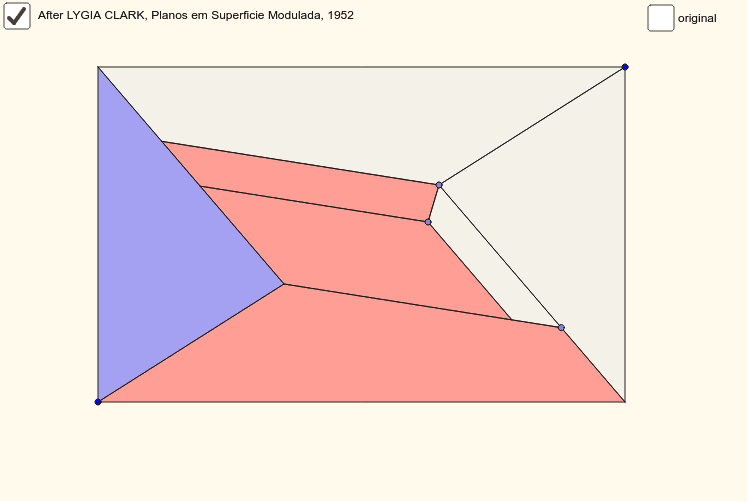
This example demonstrates the geometric construction of planes on a modulated surface. It involves core mathematical concepts such as planes, surfaces, power functions, coordinate geometry, quadrilaterals, definite integrals, and complex numbers. The construction uses GeoGebra commands and objects like Polygon, PointIn, Midpoint, Mirror, Point, Line, and Intersect. It is suitable for high school and above students to understand the integration of spatial geometry and function graphs.
GeoGebra Commands & Parameters
Polygon(A, C, B, D) → poly1, a, c, b, dPointIn(poly1) → EMidpoint(A, B) → FMirror(E, F) → E'Polygon(B, E, D) → poly2, d_1, b_1, ePolygon(C, E', A) → poly3, a_1, c_1, e'Point(b_1) → GMirror(G, F) → G'Polygon(B, E, G', C) → poly4, b_2, e_1, g', c_2Polygon(A, E', G, D) → poly5, a_2, e'_1, g, d_2Polygon(E', G, E, G') → poly6, e'_2, g_1, e_2, g'_1PointIn(poly6) → HLine(H, b_1) → fLine(H, e_1) → hIntersect(f, e'_1) → IPolygon(H, E, G, I) → poly7, h_1, e_3, g_2, iIntersect(h, a_1) → JPolygon(H, E, G', J) → poly8, h_2, e_4, g'_2, jPolygon(J, E', I, H) → poly9, j_1, e'_3, i_1, h_3Point(y = y(K)) → L
AI Drawing Prompt Reference
Construct planes on a modulated surface by creating a quadrilateral, finding midpoints, and using symmetry to mirror points. Form multiple quadrilaterals from these points and connect them with lines through intersections to create a complex geometric pattern, demonstrating the integration of spatial geometry and function graphs.
The prompt above was compiled from the original drawing commands and is for reference only.