
Plane Intersecting a Cone
Loading the math board and drawing, please wait…
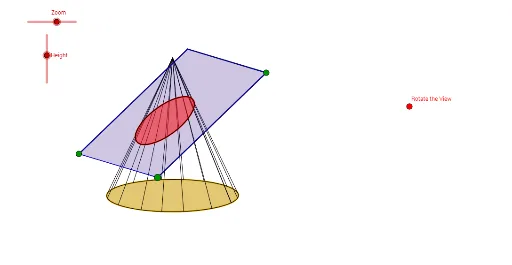
This example demonstrates the geometric cross-section shapes formed by the intersection of a plane and a cone. It involves core mathematical concepts such as conic sections (ellipses, parabolas, hyperbolas), plane geometry, quadratic equations, matrices, and differential calculus. The construction utilizes GeoGebra commands and objects like Vector, OrthogonalLine, Translate, Mirror, Polygon, Midpoint, Conic, Segment, Line, Point, Intersect, and AngularBisector. It is suitable for high school and above students to understand the connection between spatial geometry and analytical geometry, as well as the application of parametric equations.
GeoGebra Commands & Parameters
Vector(B_1, X) → uVector(B_1, Z) → wOrthogonalLine(Vues, yAxis) → aOrthogonalLine(Vues, xAxis) → bVector(B_1, Y) → vTranslate(O, Vector[(R * u)]) → O'_1Translate(O, Vector[(R * v)]) → O'_2Mirror(O'_2, O) → O''Mirror(O'_1, O) → APolygon(A, O'_2, O'_1, O'') → poly1, a_1, o', o'_1, o''Midpoint(a_1) → BMidpoint(o'') → CMidpoint(o'_1) → DMidpoint(o') → EConic(E, B, C, D, E) → dMidpoint(O, O'_2) → FMidpoint(F, B) → GMidpoint(O, G) → HMidpoint(O, G) → IMidpoint(G, I) → JMirror(J, G) → J'Conic(E, J', B, C, D) → eTranslate(O, Vector[(h * w)]) → SSegment(S, O) → fLine(O'_2, f) → iLine(A, f) → jLine(O'', f) → lPoint(j) → KPoint(i) → LPoint(l) → MSegment(K, L) → mSegment(K, M) → nLine(L, n) → pLine(M, m) → qIntersect(p, q) → NPolygon(K, L, N, M) → poly2, k_1, l_1, n_1, m_1Midpoint(k_1) → PMidpoint(l_1) → QMidpoint(m_1) → S_2Midpoint(n_1) → TLine(S, E) → rLine(B, S) → sLine(S, D) → tLine(S, C) → b_1Line(S_2, Q) → c_1Line(P, T) → d_1Intersect(c_1, r) → UIntersect(c_1, b_1) → VIntersect(s, d_1) → WIntersect(t, d_1) → A_1Segment(S, D) → e_1Segment(S, C) → f_1Segment(S, B) → g_1Segment(S, E) → h_1Line(V, m_1) → i_1Line(W, k_1) → j_1Line(U, l_1) → p_1Line(A_1, n_1) → q_1Intersect(p_1, j_1) → C_1Intersect(i_1, j_1) → D_1Intersect(q_1, i_1) → E_1Intersect(q_1, p_1) → F_1Polygon(D_1, C_1, F_1, E_1) → poly3, d_2, c_2, f_2, e_2Midpoint(C_1, E_1) → G_1Mirror(V, G_1) → V'Conic(U, V', W, V, A_1) → r_1Segment(O'_1, A) → s_1Segment(O'_2, O'') → t_1Intersect(e, s_1) → H_1, I_1Intersect(e, t_1) → J_1, K_1Segment(S, I_1) → a_2Segment(S, J_1) → b_2Segment(S, H_1) → g_2Segment(S, K_1) → h_2AngularBisector(O'_2, O, B) → i_2AngularBisector(A, O, B) → j_2AngularBisector(C, O, A) → k_2AngularBisector(O'', O, C) → l_2Midpoint(B, A) → L_1Midpoint(O'_2, B) → M_1Midpoint(O'_2, E) → N_1Midpoint(A, C) → O_1Line(O, L_1) → m_2Line(N_1, O) → n_2Line(M_1, O) → p_2Line(O_1, O) → q_2Intersect(e, p_2) → P_1, Q_1Intersect(e, m_2) → R_1, S_1Intersect(e, q_2) → T_1, U_1Intersect(e, n_2) → V_1, W_1Segment(Q_1, S) → r_2Segment(W_1, S) → s_2Segment(T_1, S) → t_2Segment(S_1, S) → a_3Segment(R_1, S) → b_3Segment(U_1, S) → c_3Segment(S, V_1) → d_3Segment(P_1, S) → e_3Intersect(e, r_1) → Z_1, A_2, B_2, C_2Conic(E, J', B, C, D) → f_3Conic(U, V', W, V, A_1) → g_3Polygon(K, L, N, M) → poly4, k_3, l_3, n_3, m_3Polygon(A, O'_2, O'_1, O'') → poly5, a_4, o'_2, o'_3, o''_1
AI Drawing Prompt Reference
Draw a geometric illustration showing the cross-section shapes formed by the intersection of a cone and a plane, including ellipses, parabolas, or hyperbolas. Start by constructing the basic shapes of the cone and the plane, then create key points using vectors, reflections, and translations. Draw polygons and conic sections using these points. Finally, add auxiliary lines and intersection points to complete a full illustration showcasing the shapes and geometric relationships of the cross-sections.
The prompt above was compiled from the original drawing commands and is for reference only.