
Plane and Distance-Difference Function
Loading the math board and drawing, please wait…
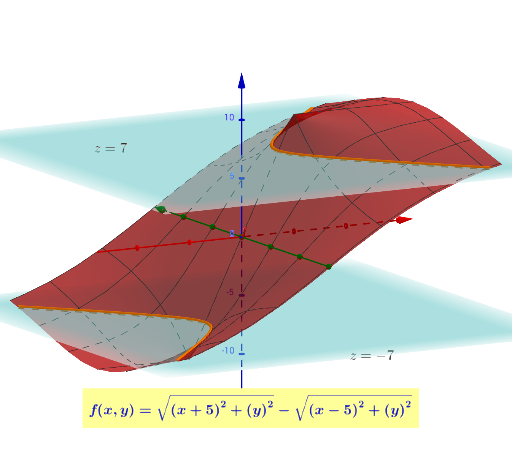
This example demonstrates the relationship between a plane and a distance-difference function. Key mathematical concepts include plane equations and distance-difference functions. Using GeoGebra commands such as IntersectPath, Ellipse, and Point, specific geometric shapes can be constructed. Suitable for high school mathematics education, particularly in coordinate geometry and function graphing.
GeoGebra Commands & Parameters
IntersectPath(b, f) → cEllipse(A, B, a) → dPoint(d) → CSegment(A, C) → gSegment(C, B) → hLaTeX(f, true, true) → text1IntersectPath(i, f) → kHyperbola(B, A, C) → p
AI Drawing Prompt Reference
Draw a plane and a distance-difference function. First, draw a plane. Then, construct a distance-difference function. Find the intersection between the plane and the distance-difference function. Draw an ellipse with these two points as foci, and pick a point on the ellipse. Connect this point to one of the foci, and then connect it to the other focus. Finally, display the formula of the distance-difference function.
The prompt above was compiled from the original drawing commands and is for reference only.