
Place Value Addition with Dots by Yoel Istiawanto
Loading the math board and drawing, please wait…
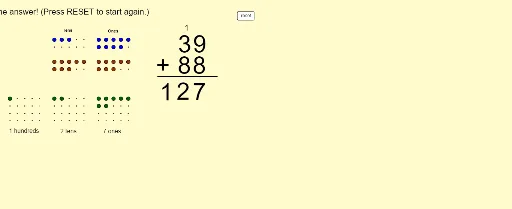
This example demonstrates the process of addition with place value using visual dots. It visually shows the addition of units, tens, and hundreds places. Key math concepts include place value, addition operations, and the decimal system. It uses GeoGebra commands like Flatten, Textfield, Mod, Sequence, and Segment, along with objects such as arrays (firstonesarray, etc.) and sliders (slideit) to dynamically illustrate the addition process. Suitable for middle-high elementary students or beginners in mathematics learning addition and place value concepts.
GeoGebra Commands & Parameters
Flatten(Sequence[Sequence[(x(A) + (i * horizontalspacing), y(A) - (j * verticalspacing)), i, 0, horizontalnumber - 1], j, 0, verticalnumber - 1]) → firstonesarrayFlatten(Sequence[Sequence[(x(B) + (i * horizontalspacing), y(B) - (j * verticalspacing)), i, 0, horizontalnumber - 1], j, 0, verticalnumber - 1]) → firsttensarrayFlatten(Sequence[Sequence[(x(C) + (i * horizontalspacing), y(C) - (j * verticalspacing)), i, 0, horizontalnumber - 1], j, 0, verticalnumber - 1]) → firsthundredsarrayFlatten(Sequence[Sequence[(x(D) + (i * horizontalspacing), y(D) - (j * verticalspacing)), i, 0, horizontalnumber - 1], j, 0, verticalnumber - 1]) → secondonesarrayFlatten(Sequence[Sequence[(x(E) + (i * horizontalspacing), y(E) - (j * verticalspacing)), i, 0, horizontalnumber - 1], j, 0, verticalnumber - 1]) → secondtensarrayFlatten(Sequence[Sequence[(x(F) + (i * horizontalspacing), y(F) - (j * verticalspacing)), i, 0, horizontalnumber - 1], j, 0, verticalnumber - 1]) → secondhundredsarrayFlatten(Sequence[Sequence[(x(G) + (i * horizontalspacing), y(G) - (j * verticalspacing)), i, 0, horizontalnumber - 1], j, 0, verticalnumberanswer - 1]) → answeronesarrayFlatten(Sequence[Sequence[(x(H) + (i * horizontalspacing), y(H) - (j * verticalspacing)), i, 0, horizontalnumber - 1], j, 0, verticalnumberanswer - 1]) → answertensarrayFlatten(Sequence[Sequence[(x(I) + (i * horizontalspacing), y(I) - (j * verticalspacing)), i, 0, horizontalnumber - 1], j, 0, verticalnumberanswer - 1]) → answerhundredsarrayTextfield(inputfirsttext) → inputfirstTextfield(inputsecondtext) → inputsecondMod(inputfirstnumber, 10) → firstonesMod(inputsecondnumber, 10) → secondonesSequence(Element[firstonesarray, i], i, 1, firstones) → displayfirstonesSequence(Element[firsttensarray, i], i, 1, firsttens) → displayfirsttensSequence(Element[secondonesarray, i], i, 1, secondones) → displaysecondonesSequence(Element[secondtensarray, i], i, 1, secondtens) → displaysecondtensSequence(Translate[Element[displayfirstones, i], Vector[(slideit * Vector[Element[firstonesarray, i], Element[answeronesarray, i]])]], i, 1, firstones) → swoopfirstonesSequence(Translate[Element[displayfirsttens, i], Vector[(slideit * Vector[Element[firsttensarray, i], Element[answertensarray, i]])]], i, 1, firsttens) → swoopfirsttensSequence(Translate[Element[displaysecondones, i], Vector[(slideit * Vector[Element[secondonesarray, i], Element[answeronesarray, i + firstones]])]], i, 1, secondones) → swoopsecondonesSequence(Translate[Element[displaysecondtens, i], Vector[(slideit * Vector[Element[secondtensarray, i], Element[answertensarray, i + firsttens]])]], i, 1, secondtens) → swoopsecondtensSequence(Element[answeronesarray, i], i, 1, answerones) → displayansweronesSequence(Element[answertensarray, i], i, 1, answertens) → displayanswertensSequence(Element[answerhundredsarray, i], i, 1, answerhundreds) → displayanswerhundredsSegment(J, K) → fMod(inputfirstnumber, 10) → inputfirstonesMod(inputsecondnumber, 10) → inputsecondones
AI Drawing Prompt Reference
Create an addition demonstration showing the process of adding units, tens, and hundreds using dots. First, visualize the dot arrays representing the units, tens, and hundreds of two numbers. Then, use a slider to control the movement and merging of these dot arrays, ultimately forming the dot arrays for the sum's units, tens, and hundreds. The process should clearly illustrate carrying and combining, with appropriate spacing and size for the dot arrays to ensure clarity.
The prompt above was compiled from the original drawing commands and is for reference only.