
Two-Digit Subtraction Visualization with Place Value Decomposition
Loading the math board and drawing, please wait…
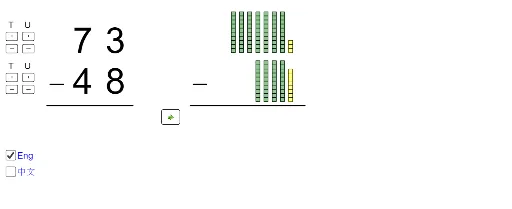
① This interactive GeoGebra example demonstrates two-digit subtraction by decomposing numbers into tens and ones, visually showing the borrowing (regrouping) process step by step. ② Core math concepts include place value, subtraction with regrouping, and the difference between two numbers. ③ Construction highlights: uses Div and Mod commands to split tens and ones, Sequence to generate digit lists, Segment and Corner to build place-value blocks, Textfield and multiple buttons (button1_1, button2_1, etc.) for user input and control, If conditions to manage borrowing logic, and dynamic text objects to display results. ④ Suitable for early elementary grades (1-3) to learn column subtraction and place value, serving as both a teacher demonstration tool and a student self-exploration activity.
GeoGebra Commands & Parameters
Div(diff, 10) → atensSegment(A, B) → fIf(nunits > munits, mtens - 1, mtens) → ntensmaxIf(ntens ≟ mtens, munits - 1, 9) → nunitsmaxSequence(Polygon[{C' + (0, i), C' + (1, i), C' + (1, i + 1), C' + (0, i + 1)}], i, 0, munits - 1) → L_1Sequence(Polygon[{D + (0, i), D + (1, i), D + (1, i + 1), D + (0, i + 1)}], i, 0, nunits - 1) → L_3Sequence(Sequence[Polygon[{D + (((-(1 + d)) * j), i), D + (1 - ((1 + d) * j), i), D + (1 - ((1 + d) * j), i + 1), D + (((-(1 + d)) * j), i + 1)}], i, 0, 9], j, 1, ntens) → L_4If(nunits > munits, C' + (-2, 10), C' + (0, munits)) → C0If((t2 * nunits) ≤ munits, (0, 0), (-2, 10 - munits)) → C1Segment(E, F) → gSequence(Sequence[Polygon[{C' + (((-(1 + d)) * j), i), C' + (1 - ((1 + d) * j), i), C' + (1 - ((1 + d) * j), i + 1), C' + (((-(1 + d)) * j), i + 1)}], i, 0, 9], j, 2, mtens) → L_2Sequence(Polygon[{C' + ((-(1 + d)), i), C' + (1 - (1 + d), i), C' + (1 - (1 + d), i + 1), C' + ((-(1 + d)), i + 1)}], i, 0, 9) → L_7Sequence(Segment[D0 + (-0.2, (-j) - 0.2), D0 + (1.2, (-(j - 1)) + 0.2)], j, 1, (t2 * nunits)) → L_5Corner(text1, 1) → GCorner(text1, 3) → HSegment(G + (0, (y(H) - y(G)) / 4), H + (0, (y(G) - y(H)) / 6)) → hSegment(I - (0.02, 0.2), I + (1.02, 10.2)) → iSegment(J - (0.02, 0.2), J + (1.02, 10.2)) → jMod(diff, 10) → aunitsSequence(Polygon[{C2 + (0, i), C2 + (1, i), C2 + (1, i + 1), C2 + (0, i + 1)}], i, 0, If[nunits > munits, 10 - nunits - 1, munits - nunits - 1]) → L_{10}Sequence(Sequence[Polygon[{C2' + (((-(1 + d)) * j), i), C2' + (1 - ((1 + d) * j), i), C2' + (1 - ((1 + d) * j), i + 1), C2' + (((-(1 + d)) * j), i + 1)}], i, 0, 9], j, 1, atens) → L_{12}Textfield(ansunits) → InputBox1Textfield(anstens) → InputBox2Corner(text2, 1) → LCorner(text2, 3) → MSegment(L + (0, (y(M) - y(L)) / 4), M + (0, (y(L) - y(M)) / 6)) → kIf(ansunits ≟ "", true, false) → notinput1If(ansunits ≟ aunits', true, false) → correct1If(anstens ≟ "", true, false) → notinput2If(anstens ≟ atens', true, false) → correct2If(nunits > munits, 1, 0) → s1If(nunits > 0, 1, 0) → s2If(aunits > 0, 1, 0) → s3If(ntens > 0, 1, 0) → s4If(atens > 0, 1, 0) → s5If(t1 + t2 + t3 + t4 + t5 ≟ s1 + s2 + s3 + s4 + s5, true, false) → finishedSequence(Translate[j, Vector[(k * Vector[(-2, 0)])]], k, 0, (t4 * ntens) - 1) → L_9Sequence(Translate[i, Vector[(j * Vector[(-2, 0)])]], j, 0, (t4 * ntens) - 1) → L_8Sequence(Segment[C0 + (-0.2, (-j) - 0.2), C0 + (1.2, (-(j - 1)) + 0.2)], j, 1, (t2 * nunits)) → L_6Sequence(Polygon[{C3' + (0, i), C3' + (1, i), C3' + (1, i + 1), C3' + (0, i + 1)}], i, 0, munits - 1) → L_{14}
AI Drawing Prompt Reference
Create a visual for two-digit subtraction with borrowing, showing place value decomposition. Use blocks to represent tens and ones for both the minuend and subtrahend, with the difference shown below. When ones are insufficient, cross out a tens block and add ten ones above. Include two input boxes for answers and buttons to control steps. Use distinct colors for tens and ones, with arrows indicating borrowing. Layout should be clear for elementary students.
The prompt above was compiled from the original drawing commands and is for reference only.