
Place Value Addition with Dots by Duane Habecker
Loading the math board and drawing, please wait…
In collections
Elementary School Applets
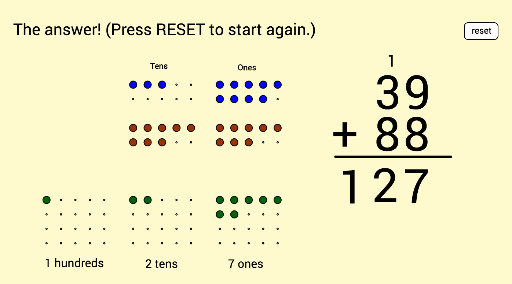
This example demonstrates addition with place value using dot matrices. It covers core math concepts like place value decomposition, addition properties, and carrying over. Constructed with GeoGebra commands like Flatten, Textfield, Mod, Sequence, and Segment, it visually models numbers and their addition. Ideal for middle elementary students to grasp number operations and place value concepts.
GeoGebra Commands & Parameters
Flatten(Sequence[Sequence[(x(A) + (i * horizontalspacing), y(A) - (j * verticalspacing)), i, 0, horizontalnumber - 1], j, 0, verticalnumber - 1]) → firstonesarrayFlatten(Sequence[Sequence[(x(B) + (i * horizontalspacing), y(B) - (j * verticalspacing)), i, 0, horizontalnumber - 1], j, 0, verticalnumber - 1]) → firsttensarrayFlatten(Sequence[Sequence[(x(C) + (i * horizontalspacing), y(C) - (j * verticalspacing)), i, 0, horizontalnumber - 1], j, 0, verticalnumber - 1]) → firsthundredsarrayFlatten(Sequence[Sequence[(x(D) + (i * horizontalspacing), y(D) - (j * verticalspacing)), i, 0, horizontalnumber - 1], j, 0, verticalnumber - 1]) → secondonesarrayFlatten(Sequence[Sequence[(x(E) + (i * horizontalspacing), y(E) - (j * verticalspacing)), i, 0, horizontalnumber - 1], j, 0, verticalnumber - 1]) → secondtensarrayFlatten(Sequence[Sequence[(x(F) + (i * horizontalspacing), y(F) - (j * verticalspacing)), i, 0, horizontalnumber - 1], j, 0, verticalnumber - 1]) → secondhundredsarrayFlatten(Sequence[Sequence[(x(G) + (i * horizontalspacing), y(G) - (j * verticalspacing)), i, 0, horizontalnumber - 1], j, 0, verticalnumberanswer - 1]) → answeronesarrayFlatten(Sequence[Sequence[(x(H) + (i * horizontalspacing), y(H) - (j * verticalspacing)), i, 0, horizontalnumber - 1], j, 0, verticalnumberanswer - 1]) → answertensarrayFlatten(Sequence[Sequence[(x(I) + (i * horizontalspacing), y(I) - (j * verticalspacing)), i, 0, horizontalnumber - 1], j, 0, verticalnumberanswer - 1]) → answerhundredsarrayTextfield(inputfirsttext) → inputfirstTextfield(inputsecondtext) → inputsecondMod(inputfirstnumber, 10) → firstonesMod(inputsecondnumber, 10) → secondonesSequence(Element[firstonesarray, i], i, 1, firstones) → displayfirstonesSequence(Element[firsttensarray, i], i, 1, firsttens) → displayfirsttensSequence(Element[secondonesarray, i], i, 1, secondones) → displaysecondonesSequence(Element[secondtensarray, i], i, 1, secondtens) → displaysecondtensSequence(Translate[Element[displayfirstones, i], Vector[(slideit * Vector[Element[firstonesarray, i], Element[answeronesarray, i]])]], i, 1, firstones) → swoopfirstonesSequence(Translate[Element[displayfirsttens, i], Vector[(slideit * Vector[Element[firsttensarray, i], Element[answertensarray, i]])]], i, 1, firsttens) → swoopfirsttensSequence(Translate[Element[displaysecondones, i], Vector[(slideit * Vector[Element[secondonesarray, i], Element[answeronesarray, i + firstones]])]], i, 1, secondones) → swoopsecondonesSequence(Translate[Element[displaysecondtens, i], Vector[(slideit * Vector[Element[secondtensarray, i], Element[answertensarray, i + firsttens]])]], i, 1, secondtens) → swoopsecondtensSequence(Element[answeronesarray, i], i, 1, answerones) → displayansweronesSequence(Element[answertensarray, i], i, 1, answertens) → displayanswertensSequence(Element[answerhundredsarray, i], i, 1, answerhundreds) → displayanswerhundredsSegment(J, K) → fMod(inputfirstnumber, 10) → inputfirstonesMod(inputsecondnumber, 10) → inputsecondones
AI Drawing Prompt Reference
Visualize the addition of two-digit numbers using dot matrices to show the decomposition and carry-over of units, tens, and hundreds. First draw the dot matrices for the units, tens, and hundreds of two numbers, then add them together by connecting the corresponding dots with arrows, and finally display the dot matrices for the units, tens, and hundreds of the sum to illustrate the addition process and carry-over.
The prompt above was compiled from the original drawing commands and is for reference only.