
Perspective Vanishing Points: Symmetric Ellipse-Guided Construction
Loading the math board and drawing, please wait…
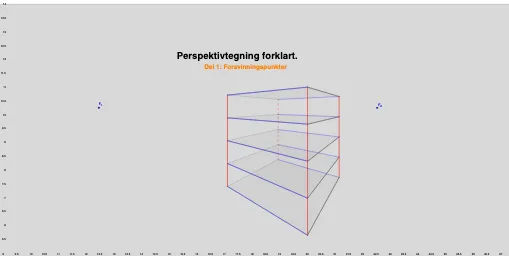
This GeoGebra example demonstrates how to construct perspective “vanishing points” in a planar setting and use them to organize polygonal structures and related curve positions, producing a visually coherent, symmetry-driven diagram with a strong frequency/recurrence feel. Key mathematical ideas include vanishing-point geometry (a construction principle for perspective), orthogonal constructions to fix constraints, locating intersection-defined nodes, and enforcing symmetry via midpoint-based relationships. Construction is carried out using GeoGebra commands from the provided build list: OrthogonalLine (to generate perpendicular/orthogonal helper lines), Point (to create construction points), Intersect (to compute key intersection points), Polygon (to draw the polygonal framework), Line and Segment (to define infinite lines and bounded connectors), and Midpoint (to obtain midpoints for symmetry or scale control). The named objects (e.g., PP, f, F_1, F_2, A–D, poly1, a–d, E, g, F, k–l, H, m, I–J–K, and additional grouped points) represent the multi-step construction chain that anchors the diagram around the vanishing-point layout. Suitable for advanced secondary education and introductory university courses on geometric construction and coordinate/perspective geometry, as well as math visualization activities.
GeoGebra Commands & Parameters
OrthogonalLine(PP, yAxis) → fPoint(f) → F_1Point(f) → F_2Intersect(xAxis, yAxis) → APoint(xAxis) → BPoint(yAxis) → DPolygon(A, B, C, D) → poly1, a, b, c, dLine(E, yAxis) → gPoint(g) → FSegment(E, F_2) → kSegment(F, F_2) → lPoint(k) → HLine(H, yAxis) → mMidpoint(F, E) → IMidpoint(E, I) → JMidpoint(I, F) → KSegment(F_1, E) → hSegment(F_1, F) → iSegment(K, F_1) → jSegment(I, F_1) → nSegment(J, F_1) → pSegment(J, F_2) → qSegment(I, F_2) → rSegment(K, F_2) → sPoint(h) → GLine(G, yAxis) → tIntersect(t, i) → LSegment(G, L) → eSegment(F, E) → f_1Intersect(m, l) → MSegment(H, M) → g_1Segment(G, E) → h_1Intersect(t, p) → NSegment(J, N) → i_1Intersect(t, n) → OSegment(I, O) → j_1Intersect(t, j) → PSegment(K, P) → k_1Segment(F, L) → l_1Segment(E, H) → m_1Intersect(m, q) → QSegment(J, Q) → n_1Intersect(m, r) → RSegment(I, R) → p_1Intersect(m, s) → SSegment(K, S) → q_1Segment(F, M) → r_1Segment(G, F_2) → s_1Segment(N, F_2) → t_1Segment(O, F_2) → a_1Segment(P, F_2) → b_1Segment(L, F_2) → c_1Segment(F_1, H) → d_1Segment(Q, F_1) → e_1Segment(F_1, S) → f_2Segment(M, F_1) → g_2Intersect(c_1, g_2) → TPolygon(L, T, M, F) → poly2, l_2, t_2, m_2, f_3Intersect(b_1, f_2) → UPolygon(P, U, S, K) → poly3, p_2, u, s_2, k_2Segment(F_1, R) → h_2Intersect(a_1, h_2) → VPolygon(O, V, R, I) → poly4, o, v, r_2, i_2Intersect(t_1, e_1) → WPolygon(Q, W, N, J) → poly5, q_2, w, n_2, j_2Intersect(s_1, d_1) → ZPolygon(G, E, H, Z) → poly6, g_3, e_2, h_3, z_1Intersect(s_1, d_1) → A_1Intersect(c_1, g_2) → B_1Segment(A_1, B_1) → a_2Intersect(e, l_1) → C_1Segment(F_1, C_1) → PerspectiveIntersect(e, h_1) → D_1Intersect(g_1, n_1) → E_1Segment(D_1, E_1) → b_2Segment(D_1, E_1) → c_2Intersect(e, i_1) → F_3Intersect(g_1, p_1) → G_1Segment(F_3, G_1) → d_2Intersect(e, j_1) → H_1Intersect(g_1, q_1) → I_1Segment(H_1, I_1) → i_3Intersect(e, k_1) → J_1Intersect(g_1, r_1) → K_1Segment(J_1, K_1) → j_3Intersect(e, h_1) → L_1Intersect(g_1, n_1) → M_1Segment(L_1, M_1) → k_3Segment(L_1, M_1) → l_3
AI Drawing Prompt Reference
Draw a symmetric ellipse-guided construction of perspective vanishing points. Start by plotting the coordinate axes and finding their intersection point to construct a quadrilateral. Then, use lines perpendicular to the y-axis to locate two vanishing points, from which multiple lines and connecting segments are drawn to form a complex geometric structure. Emphasize symmetry and a sense of frequency through midpoint connections and relationships.
The prompt above was compiled from the original drawing commands and is for reference only.