
Perpendicular Vectors: Constructing Orthogonality with Vector and Angle Commands
Loading the math board and drawing, please wait…
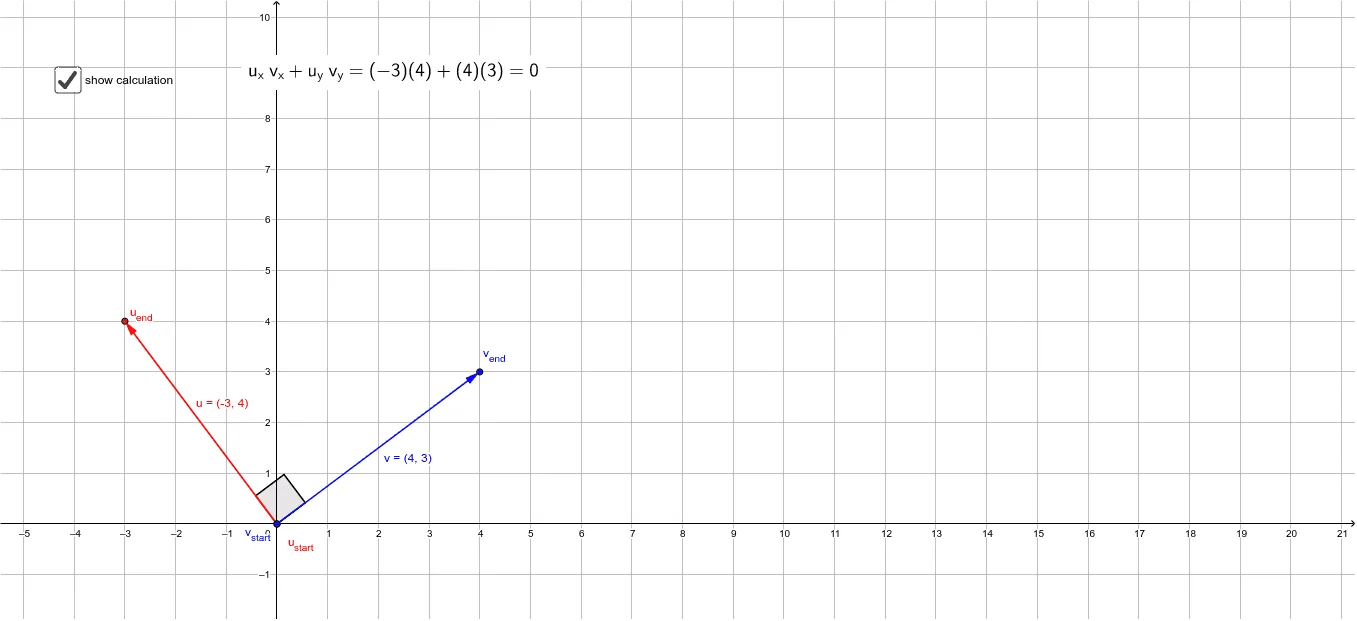
① This example demonstrates how to construct two perpendicular vectors in GeoGebra and visually verify that the angle between them is 90 degrees. ② The core mathematical concept is the perpendicularity of vectors, which can be checked via a zero dot product or a right angle; it also involves vector representation by start and end points and angle measurement. ③ Construction highlights: use the Vector command to create vector u (from u_start to u_end) and vector v (from v_start to v_end), use the Angle command to display the angle θ between them, and include a calculation to confirm orthogonality; objects include u_end, u_start, u, v_start, v_end, v, a, b, c, d, θ, e. ④ Suitable for high school or early college analytic geometry and vector lessons, useful for demonstrating the definition, verification, and dynamic adjustment of perpendicular vectors.
GeoGebra Commands & Parameters
Vector(u_{start}, u_{end}) → uVector(v_{start}, v_{end}) → vAngle(u, v) → θ
AI Drawing Prompt Reference
Draw a coordinate plane with two vectors represented as arrowed line segments, each defined by a start and end point. The first vector goes from one point to another, and the second vector goes from a different start point to a third point. Mark the angle between the two vectors with an angle symbol, showing it as a right angle (90 degrees). The diagram should clearly display the vectors' directions and positions, allowing dynamic adjustment of endpoints while maintaining perpendicularity.
The prompt above was compiled from the original drawing commands and is for reference only.