
Perpendicular Lines
Loading the math board and drawing, please wait…
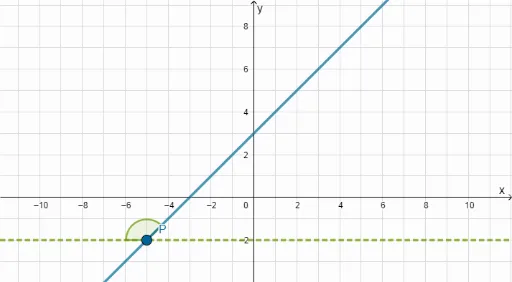
This example demonstrates the equations of perpendicular lines. It involves core concepts of linear equations and linear functions. Using GeoGebra commands such as Random, Simplify, and Intersect, perpendicular lines can be constructed. Suitable for middle school and above students to learn linear equations and geometric construction.
GeoGebra Commands & Parameters
Random(-10, 10) → b1Simplify((m1 * x) + b1) → fMin({bound1, bound2}) → minMax({min, -8}) → min2Max({bound1, bound2}) → maxMin({8, max}) → max2Random(min2, max2) → aIntersect(f, h) → AAngle(R, A, S) → βAngle(R, A, Q) → αIf(m1 < 0, β, α) → γTextfield(empty) → InputBox1FractionText(b) → text7
AI Drawing Prompt Reference
Draw two perpendicular lines. First, randomly generate a slope m1 and y-intercept b1 to form line f. Then, randomly generate a point A as the intersection of line f and horizontal line h. Next, construct two lines through point A and point R, forming angles β and α with the horizontal line. If the slope m1 is less than 0, angle β is used; otherwise, angle α is used to get angle γ. Finally, display the fractional form of the y-intercept b1.
The prompt above was compiled from the original drawing commands and is for reference only.