
Perpendicular Lines by Jonathan Longstaffe
Loading the math board and drawing, please wait…
In collections
Parallel and Perpendicular
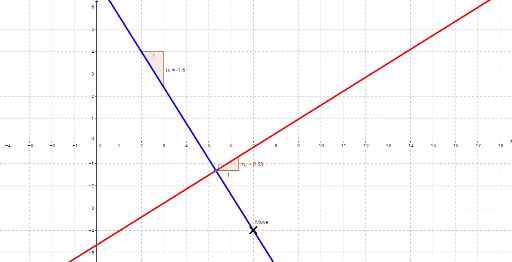
This example demonstrates how to draw two perpendicular lines and explore their geometric properties. Key math concepts include slope, point, and orthogonal line. Construction highlights involve using commands like Line, Slope, Point, and OrthogonalLine. Suitable for high school students learning about basic perpendicular line concepts and constructions.
GeoGebra Commands & Parameters
Line(A, Move) → aSlope(a) → mPoint(a) → COrthogonalLine(C, a) → bSlope(b) → m_1
AI Drawing Prompt Reference
Draw two perpendicular lines and display their intersection point and slopes. Start by drawing a line, then select an arbitrary point on the line and calculate its slope. Next, draw a line starting from this point that is perpendicular to the original line, and calculate the slope of the new line. Finally, mark the intersection point of the two lines and their respective slopes to clearly demonstrate the geometric properties of perpendicular lines.
The prompt above was compiled from the original drawing commands and is for reference only.