
Perpendicular Bisector Exploration
Loading the math board and drawing, please wait…
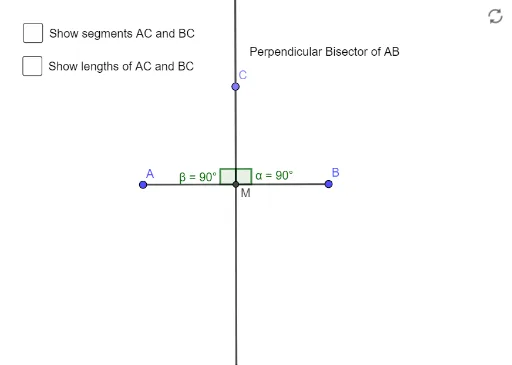
This example demonstrates how to construct the perpendicular bisector of a segment using GeoGebra and explore its properties. The core math concepts involved include the midpoint of a segment, perpendicular lines, and angles. Construction highlights: Using GeoGebra commands/objects like Segment, Midpoint, OrthogonalLine, Point, and Angle; objects include A, B, f, M, g, C, h, i, text1, text2, a, α, β, b, c. Suitable for middle school and above mathematics education, for geometric construction and property exploration.
GeoGebra Commands & Parameters
Segment(A, B) → fMidpoint(A, B) → MOrthogonalLine(M, f) → gPoint(g) → CSegment(C, A) → hSegment(C, B) → iAngle(B, M, C) → αAngle(C, M, A) → β
AI Drawing Prompt Reference
Draw a line segment, find its midpoint, then construct a line perpendicular to the segment at the midpoint. Take a point on the line segment and connect it to the endpoints, forming two triangles. Measure and label the angles in these triangles to explore the properties of the perpendicular bisector.
The prompt above was compiled from the original drawing commands and is for reference only.