
Perimeters and Area of Similar Figures
Loading the math board and drawing, please wait…
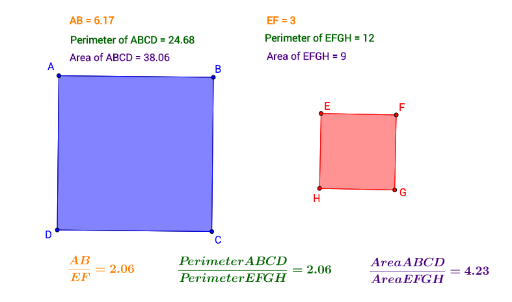
This example demonstrates the relationship between the perimeters and areas of similar figures. Key mathematical concepts include the properties of similar figures and the ratio of areas to perimeters. Using GeoGebra commands such as Segment, OrthogonalLine, Circle, Intersect, and Polygon, similar figures can be constructed and the changes in their perimeters and areas can be observed. Suitable for students at the junior high school level and above.
GeoGebra Commands & Parameters
Segment(A, B) → fOrthogonalLine(B, f) → gOrthogonalLine(A, f) → hCircle(B, Segment[A, B]) → cCircle(A, Segment[B, A]) → dIntersect(d, h, 1) → DIntersect(c, g, 1) → CSegment(D, C) → iSegment(C, B) → jSegment(A, D) → kPolygon(A, B, C, D) → poly1, a, b, c_1, d_1Polygon(H, G, 4) → poly2, l, m, n, p, F, E
AI Drawing Prompt Reference
Draw two similar figures to show the relationship between perimeter and area. Start with a horizontal base segment. At each endpoint, construct a perpendicular line. Using one endpoint as center and the base length as radius, draw a circle that intersects the opposite perpendicular to get one upper vertex. Similarly, using the other endpoint as center and the same radius, draw another circle to get the other upper vertex. Connect these vertices to form a rectangle. Then draw a second, larger similar rectangle with proportional sides. Label the perimeters and areas of both rectangles to compare how they change.
The prompt above was compiled from the original drawing commands and is for reference only.