
Perimeter of Triangle/Parallelogram
Loading the math board and drawing, please wait…
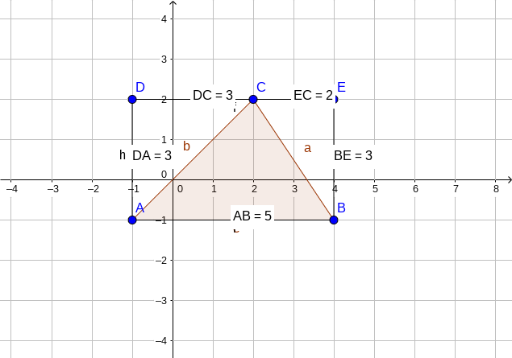
This example demonstrates how to calculate the perimeter of a triangle and a parallelogram using geometric construction. Key mathematical concepts include line segment length, midpoint, and polygon. Using GeoGebra commands such as Polygon, Segment, Distance, and Midpoint, the construction process is dynamically shown. Suitable for middle school and above students to learn geometry and measurement.
GeoGebra Commands & Parameters
Polygon(A, B, C) → poly1, c, a, bSegment(D, E) → fSegment(B, E) → gSegment(D, A) → hSegment(A, B) → iDistance(D, C) → distanceDCMidpoint(D, C) →Distance(D, A) → distanceDAMidpoint(D, A) →Distance(A, B) → distanceABMidpoint(A, B) →Distance(B, E) → distanceBEMidpoint(B, E) →Distance(E, C) → distanceECMidpoint(E, C) →
AI Drawing Prompt Reference
Draw a triangle and a parallelogram sharing one side. Mark the midpoint of each side of both shapes and display the length of each side. First construct the triangle, then the parallelogram. Then measure and label the lengths of all sides of the triangle and the parallelogram, and place a point at the midpoint of every side. The final figure should clearly show all side lengths for perimeter calculation.
The prompt above was compiled from the original drawing commands and is for reference only.