
Perimeter of Composite L Shapes
Loading the math board and drawing, please wait…
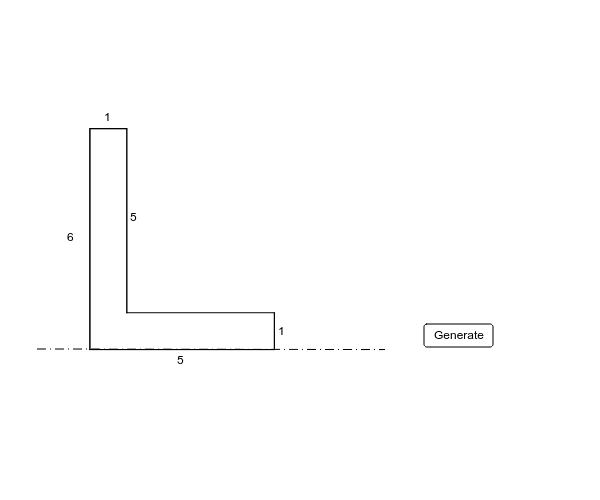
This example demonstrates how to calculate the perimeter of composite figures composed of L shapes. It involves core math concepts like perimeter calculation, polygon properties, and coordinate geometry. Constructed using GeoGebra commands/objects such as Point, Random, Segment, and Distance. Suitable for high school students learning perimeter computation and optimization problems.
GeoGebra Commands & Parameters
Point(xAxis) → ARandom(5, 8) → x2Random(1, 4) → x1Random(4, 7) → y1Segment(A, B) → aSegment(B, C) → bRandom(1, 3) → y2Segment(C, D) → cSegment(D, E) → dSegment(E, F) → eSegment(F, A) → fSegment(A, B) → gDistance(c, b) → hDistance(e, d) → iDistance(a, f) → jRandom(1, 6) → z1Segment(B, C) → kSegment(C, D) → lSegment(D, E) → mSegment(E, F) → nSegment(F, A) → pSegment(G, H) → q
AI Drawing Prompt Reference
Draw a composite figure made of two L-shapes, starting with one L-shape and adding another L-shape attached to one side of the first. Ensure the two L-shapes overlap partially. Use points to define the starting points, generate random coordinates, and draw line segments to form closed polygons. Calculate and display the total length of the overlapping and external edges to demonstrate how to compute the perimeter of the composite figure.
The prompt above was compiled from the original drawing commands and is for reference only.