
Perimeter of a Shape: Dynamic Polygon Measurement
Loading the math board and drawing, please wait…
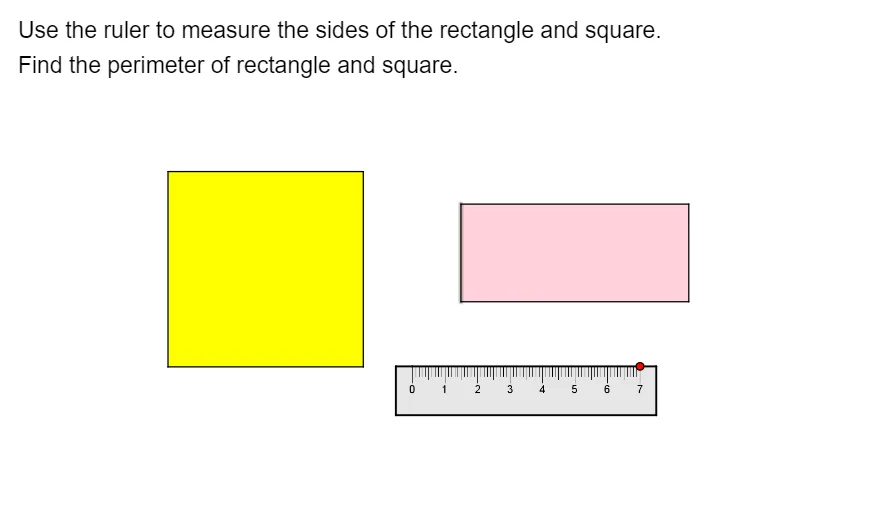
① This GeoGebra example demonstrates how to measure and calculate the perimeter of an irregular polygon dynamically, showing the sum of its side lengths. ② Core math concepts include polygon perimeter, side length measurement, linear equations (for side relations), arithmetic operations (summation), and properties of trapezoids. ③ Construction highlights: uses Point, UnitOrthogonalVector, UnitVector, and Polygon commands to create points, unit vectors, and polygon objects; a ruler object assists measurement; multiple points (A_1 to A_6) and edges (a to i) form the polygon, with text2 displaying the final perimeter value. ④ Suitable for middle and high school students learning geometry perimeter concepts, GeoGebra basic construction, and mathematical experimentation, as well as for teachers demonstrating dynamic side-length calculations in class.
GeoGebra Commands & Parameters
Point(Circle[A_1, ruler]) → A_6UnitOrthogonalVector(Segment[A_1, A_6]) → vUnitVector(Segment[A_1, A_6]) → uPolygon(A_1, A_2, A_3, A_4, A_5, A_6) → poly6, a_3, a_4, a_5, a_6, a_7, a_8Polygon((-4, -1), (2, -1), (2, 5), (-4, 5)) → poly1, a, b, c, dPolygon((5, 1), (12, 1), (12, 4), (5, 4)) → poly2, e, g, h, i
AI Drawing Prompt Reference
Draw an irregular hexagon and dynamically display its perimeter. First, construct a hexagon with six vertices, then measure the length of each side and sum them to calculate the perimeter. Show the length of each side and the total perimeter value, using unit orthogonal and unit vectors for assistance in construction.
The prompt above was compiled from the original drawing commands and is for reference only.