
Perimeter of a Rectangle - Dynamic Demonstration
Loading the math board and drawing, please wait…
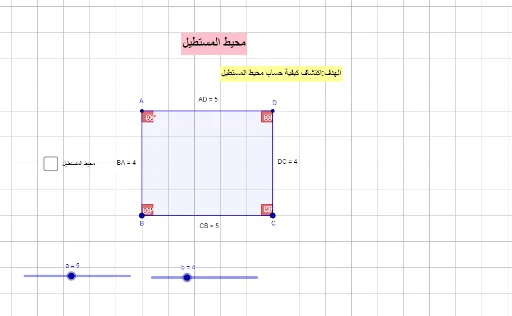
This GeoGebra example dynamically demonstrates the perimeter of a rectangle and its calculation. The core mathematical concept is the perimeter formula for a rectangle (P = 2 × (length + width)), along with measuring side lengths and summing them. Construction highlights: using Point, Segment, and Polygon commands to create rectangle poly1; Distance commands (distanceAD, distanceDC, etc.) to measure each side; Perimeter command to compute the total perimeter; and Text commands to display side lengths and the perimeter value. Additional tools include Midpoint, OrthogonalLine, Intersect, and Angle to mark right angles. Suitable for upper elementary or middle school students learning basic geometry, and for teachers demonstrating perimeter concepts in class.
GeoGebra Commands & Parameters
Point(Circle[B, a]) → CSegment(B, C) → NCircle(C, b) → cOrthogonalLine(C, N) → iIntersect(c, i) → C_1, DSegment(D, C) → OOrthogonalLine(D, O) → kOrthogonalLine(B, N) → lIntersect(k, l) → APolygon(A, D, C, B) → poly1, L, d, b_1, MAngle(B, A, D) → αAngle(C, B, A) → βAngle(D, C, B) → γAngle(A, D, C) → δDistance(O, M) → mPointIn(poly1) → نقطةpoly1_1Perimeter(poly1) → محيطpoly1PointIn(poly1) → نقطةpoly1Distance(A, D) → distanceADMidpoint(A, D) →Distance(D, C) → distanceDCMidpoint(D, C) →Distance(C, B) → distanceCBMidpoint(C, B) →Distance(B, A) → distanceBAMidpoint(B, A) →