
Perimeter and Area of Rectangles: Dynamic Exploration
Loading the math board and drawing, please wait…
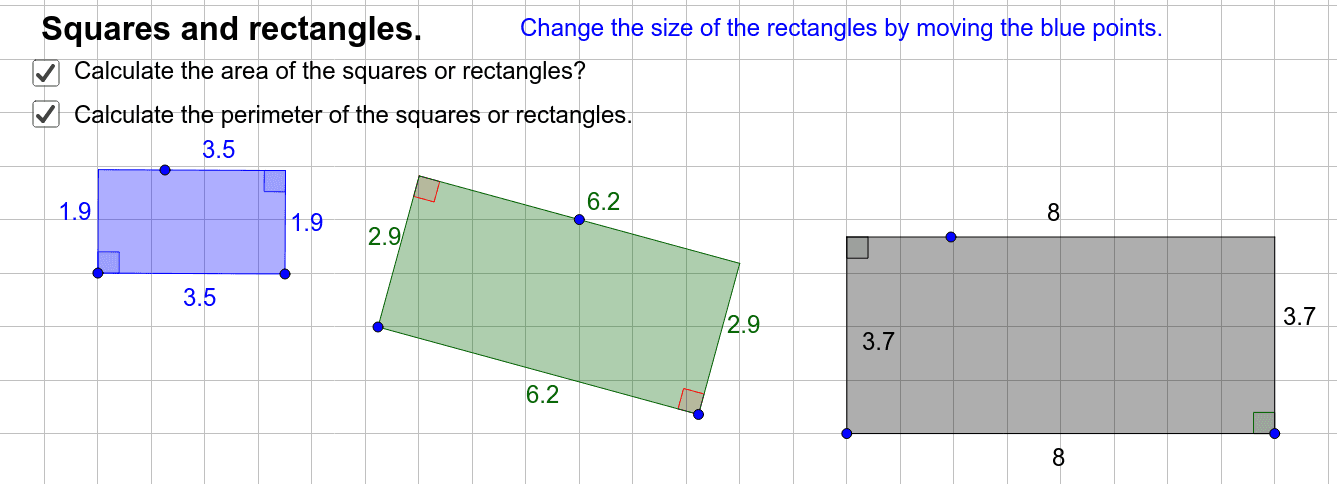
This GeoGebra example dynamically demonstrates the calculation of perimeter and area for rectangles. It visually shows how changing the side lengths affects both the perimeter (2×(length+width)) and the area (length×width), reinforcing the fundamental geometric formulas. The construction uses commands such as Line, Point, OrthogonalLine, Intersect, Polygon, and Angle to build the rectangle, mark right angles, and display measurements via text objects. It is suitable for upper elementary and middle school students learning basic geometry, and serves as an effective teaching tool for illustrating the relationship between dimensions and derived quantities.
GeoGebra Commands & Parameters
Line(A, B) → fLine(C, f) → gPoint(g) → DOrthogonalLine(B, g) → hIntersect(g, h) → EOrthogonalLine(A, g) → iIntersect(g, i) → FPolygon(F, A, B, E) → poly1, f_1, a, b, eAngle(B, A, F) → αAngle(F, E, B) → βLine(A_2, B_2) → f_4Line(C_4, f_4) → g_2Point(g_2) → D_2OrthogonalLine(B_2, g_2) → h_2Intersect(g_2, h_2) → E_2OrthogonalLine(A_2, g_2) → i_2Intersect(g_2, i_2) → F_2Polygon(F_2, A_2, B_2, E_2) → poly1_2, f_5, a_2, b_2, e_2Angle(B_2, A_2, F_2) → α_2Angle(F_2, E_2, B_2) → β_2Line(A_3, B_3) → f_6Line(C_6, f_6) → g_3Point(g_3) → D_3OrthogonalLine(B_3, g_3) → h_3Intersect(g_3, h_3) → E_3OrthogonalLine(A_3, g_3) → i_3Intersect(g_3, i_3) → F_3Polygon(F_3, A_3, B_3, E_3) → poly1_3, f_7, a_3, b_3, e_3Angle(B_3, A_3, F_3) → α_3Angle(F_3, E_3, B_3) → β_3Angle(A_2, F_2, E_2) → γAngle(E_2, B_2, A_2) → δAngle(A_3, F_3, E_3) → εAngle(E_3, B_3, A_3) → ζ
AI Drawing Prompt Reference
Draw three rectangles arranged side by side, each formed by a horizontal base and a slanted parallel top edge, with perpendicular lines from the base endpoints meeting the top edge to complete the quadrilateral. Mark four right-angle symbols inside each rectangle and display side lengths and diagonals. The three rectangles differ in size, changing from left to right, to visually compare how perimeter and area vary with dimensions. The layout is clear and educational, emphasizing that perimeter equals twice the sum of length and width, and area equals length times width.
The prompt above was compiled from the original drawing commands and is for reference only.