
Partial Derivatives Visualization: Tangent Planes and Directional Slopes on a Su
Loading the math board and drawing, please wait…
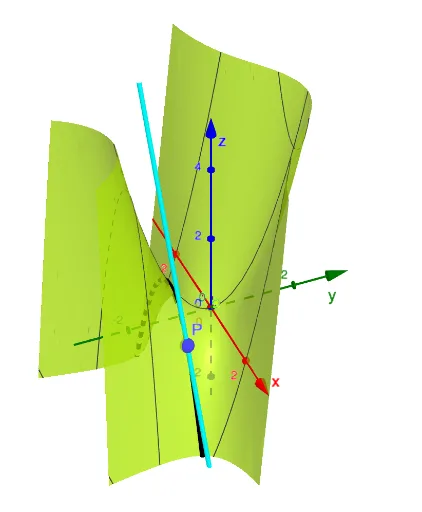
This GeoGebra example dynamically visualizes the concept of partial derivatives for a two-variable function, showing how the surface changes instantaneously along the x- and y-directions at a given point. The core mathematical concepts include partial derivatives, tangent planes, directional derivatives, and multivariable calculus. Construction highlights: the CurveCartesian command is used to create a parametric surface, with point P as the point of interest, slider a controlling the surface shape, and objects b and c representing the slopes of tangent lines along the x- and y-axes respectively, thereby revealing the geometric meaning of partial derivatives in 3D space. Suitable for university-level calculus or multivariable calculus courses, as well as for advanced high school enrichment or teacher-led interactive demonstrations.
GeoGebra Commands & Parameters
CurveCartesian(t, -1, 1 - t^(2), t, -5, 5) → bCurveCartesian(1 + t, -1, (-2 * t), t, -10, 10) → c
AI Drawing Prompt Reference
Create a 3D plot showing a parametric surface generated by sweeping a parabolic curve horizontally, with its shape adjustable by a slider. Mark a specific point on the surface as the point of interest. Through this point, draw two tangent lines: one along the x-direction (a straight line) and one along the y-direction (a curve), representing the instantaneous slopes in those directions. Additionally, construct a tangent plane at that point to illustrate the geometric meaning of partial derivatives. The scene should include coordinate axes, the surface, the tangent lines, and the tangent plane, with emphasis on the point and its local behavior.
The prompt above was compiled from the original drawing commands and is for reference only.