
3D Geometry and Vectors: Constructing Space Relations with Equations
Loading the math board and drawing, please wait…
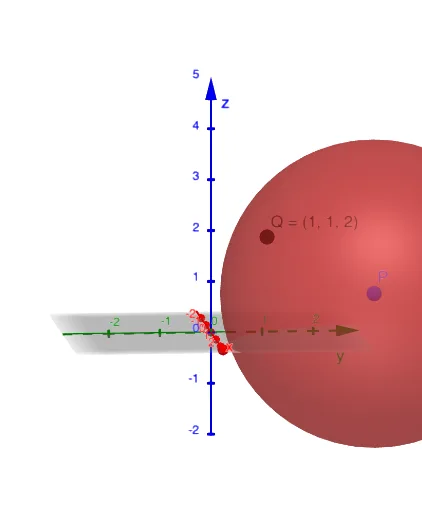
This example demonstrates how to visualize and construct spatial relationships in 3D geometry, focusing on point-based setup and equation-driven constraints to reveal geometric structure. The key concepts include solid (3D) geometry, vectors as directional/positional relationships, and the use of conditional equations (e.g., equation-based constructions related to secant/line intersections or section constraints) to determine the required geometric locus/position. Construction-wise, it follows the provided GeoGebra construction summary: it defines the constraint object eq1 (typically an equation or condition involving spatial parameters), introduces points P and Q as reference/endpoint objects, and then uses eq1 together with P and Q to locate or derive the geometric entities that satisfy the equation and encode the intended spatial relation. Suitable for late secondary school to early undergraduate learners, it works well for class demonstrations and for building intuition in 3D analytic geometry and vector-based reasoning.
GeoGebra Commands & Parameters
(x - 2)^(2) + (y - 3)^(2) + (z - 1)^(2) = 9(2, 3, 1)(1, 1, 2)
AI Drawing Prompt Reference
In a 3D coordinate system, first place reference point P at (2, 3, 1) and another reference point Q at (1, 1, 2). Then construct the locus of all spatial points (x, y, z) that satisfy the equation (x−2)^2 + (y−3)^2 + (z−1)^2 = 9. Visualize this constraint as a surface determined by the fixed-distance condition centered at P, with the radius set by the given equation. Mark point Q on the same 3D scene to serve as a second reference for the spatial relationship.
The prompt above was compiled from the original drawing commands and is for reference only.