
Part 3 - Rhombus: Dynamic Exploration of Sides, Diagonals, Perimeter and Angles
Loading the math board and drawing, please wait…
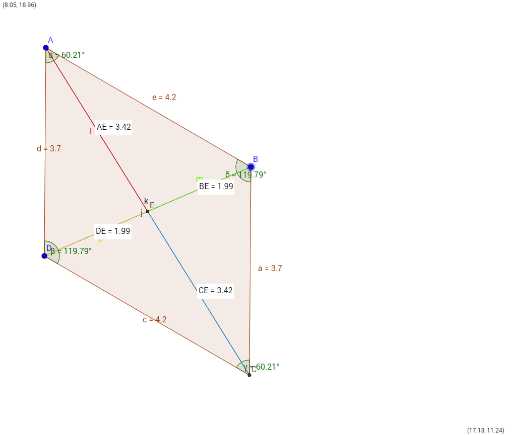
① This example demonstrates how to construct a complete rhombus in GeoGebra, dynamically showing the relationships among side lengths, diagonals, perimeter, and interior angles. ② Core mathematical concepts include the definition of a rhombus (all sides equal), perpendicular bisecting diagonals, parallel opposite sides, equal opposite angles, and calculations of perimeter and distances. ③ Construction highlights: from the summary, commands such as Segment, Line, Intersect, Polygon, Perimeter, PointIn, Angle, Distance, and Midpoint are used, creating objects D, A, g, B, h, f, i, C, poly1, d, c, a, e, perimeterpoly1, Pointpoly1, α, β, γ, δ, j, k, E, l, m, n, p, and computing distances BE, AE, DE, CE with text labels. ④ Suitable for middle school geometry classes to intuitively grasp rhombus properties, perimeter and diagonal relations, and as a dynamic exploration or exercise demonstration.
GeoGebra Commands & Parameters
Segment(D, A) → gSegment(A, B) → hLine(D, h) → fLine(B, g) → iIntersect(f, i) → CPolygon(A, D, C, B) → poly1, d, c, a, ePerimeter(poly1) → perimeterpoly1PointIn(poly1) → Pointpoly1Angle(poly1) → α, β, γ, δSegment(A, C) → jSegment(B, D) → kIntersect(j, k) → ESegment(A, E) → lSegment(B, E) → mSegment(C, E) → nSegment(D, E) → pDistance(B, E) → distanceBEMidpoint(B, E) →Distance(A, E) → distanceAEMidpoint(A, E) →Distance(D, E) → distanceDEMidpoint(D, E) →Distance(C, E) → distanceCEMidpoint(C, E) →
AI Drawing Prompt Reference
Draw a rhombus and dynamically show the relationships among its side lengths, diagonals, perimeter, and interior angles. Start by drawing two intersecting line segments, find their intersection point, and use it to construct the rhombus. Then, calculate and display the perimeter of the rhombus, as well as the lengths of its sides and diagonals. Finally, label the four interior angles of the rhombus and the intersection point of the diagonals, and calculate the distances from the intersection point to each vertex.
The prompt above was compiled from the original drawing commands and is for reference only.