
Parametrically-Defined Surfaces
Loading the math board and drawing, please wait…
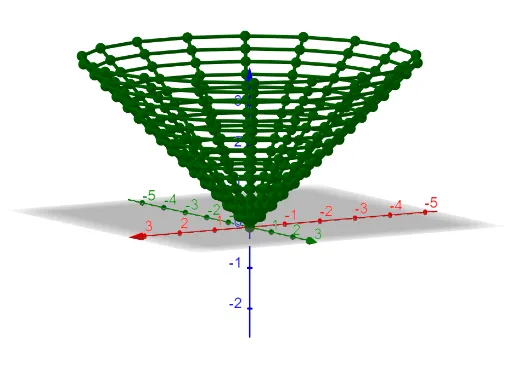
This example visualizes parametrically-defined surfaces. Users can input functions of two variables for the x, y, and z coordinates. Adjusting the input boxes changes the surface. Key concepts include parametric equations, coordinate geometry, and calculus. GeoGebra commands used include Sequence, Textfield, and InputBox. Suitable for university-level calculus and coordinate geometry courses.
GeoGebra Commands & Parameters
Sequence(Sequence[((-u) + ((i * 2) * u / n), (j * v / m)), i, 0, n, 1], j, 0, m, 1) → l1Textfield(f) → InputBox1Textfield(g) → InputBox2Sequence(Sequence[(((t - 1) * x(l1(i, j))) + (t * f(l1(i, j))), ((t - 1) * y(l1(i, j))) + (t * g(l1(i, j))), ((t - 1) * z(l1(i, j))) + (t * h(l1(i, j)))), i, 1, m, 1], j, 1, n + 1, 1) → l2Textfield(h) → InputBox3Sequence(Sequence[Segment[l1(i, j), l1(i + 1, j)], j, 1, n + 1, 1], i, 1, m, 1) → l5Sequence(Sequence[Segment[l1(i, j), l1(i, j + 1)], j, 1, n, 1], i, 1, m + 1, 1) → l6Sequence(Sequence[Segment[l2(i, j), l2(i, j + 1)], j, 1, m - 1, 1], i, 1, n + 1, 1) → l4Sequence(Sequence[Segment[l2(i, j), l2(i + 1, j)], j, 1, m, 1], i, 1, n, 1) → l3