
Parametric Ellipse Equation
Loading the math board and drawing, please wait…
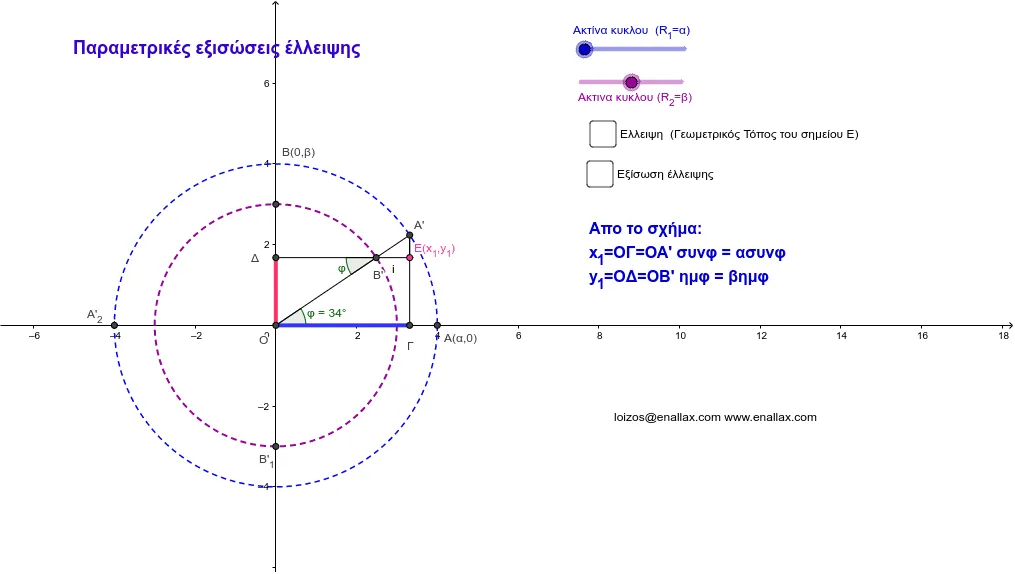
This example demonstrates the parametric equation of an ellipse, involving the parametric representation of ellipses. Using GeoGebra commands such as Intersect, Rotate, Angle, etc., it dynamically illustrates the geometric properties of ellipses. Suitable for high school math education, helping students understand the parametric equation and geometric meaning of ellipses.
GeoGebra Commands & Parameters
Intersect(xAxis, yAxis) → OIntersect(d, xAxis) → A'_2, A_2Rotate(A_2, α, O) → A'Angle(A_2, O, A') → φRay(O, A') → eIntersect(c, e) → B',OrthogonalLine(A', xAxis) → fOrthogonalLine(B', f) → gIntersect(f, g) → ESegment(A', E) → hSegment(B', E) → iIf(j, 1, 0) → speedIntersect(f, xAxis) → ΓIntersect(g, yAxis) → ΔSegment(O, Γ) → kSegment(Δ, O) → lSegment(A', Γ) → mSegment(O, A') → nIntersect(c, yAxis) → B'_1, B_2Segment(B', Δ) → pAngle(Δ, B', O) → γ
AI Drawing Prompt Reference
Draw an ellipse to demonstrate its parametric equation. Start by plotting the coordinate axes and finding their intersection as the origin. Determine the major and minor axes of the ellipse, rotating a point on the major axis to locate a point on the minor axis. Then, use these points to draw auxiliary lines and find their intersection. Finally, connect these key points with line segments to form the ellipse's outline, dynamically illustrating the geometric meaning of its parametric equation.
The prompt above was compiled from the original drawing commands and is for reference only.