
Parallelograms: Area Exploration Templates
Loading the math board and drawing, please wait…
In collections
Elementary Math Resources
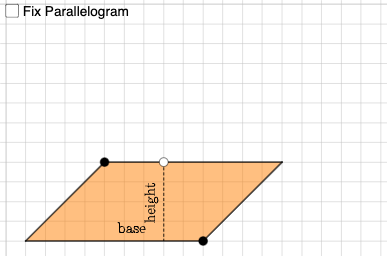
This example demonstrates the calculation and exploration of parallelogram area. It involves core math concepts like parallelogram properties, area formulas, rotation, and coordinate geometry. Construction highlights include using commands/objects such as Point, PointIn, Segment, Intersect, Circle, Line, OrthogonalLine, Polygon, RotateText in GeoGebra. Suitable for high school mathematics teaching to help students visually understand the parallelogram area formula and its applications.
GeoGebra Commands & Parameters
Point(xAxis) → APoint(Ray[(0, 0), (1, 0)]) → BPointIn(x ≥ 0 ∧ y ≥ 0 ∧ x ≤ x(B)) → CSegment(C, D) → fIntersect(eq1, f) → ESegment(C, E) → gPoint(g) → FCircle(H, Distance[A, G]) → ePoint(e) → ILine(H, I) → hOrthogonalLine(I, h) → iCircle(I, Distance[G, F]) → kIntersect(k, i, 2) → JLine(J, h) → jCircle(J, Distance[F, C]) → pIntersect(p, j, 1) → KPolygon(H, I, J, K) → q3, h_1, i_1, j_1, k_1Circle(L, Distance[G, B]) → qPoint(q) → MLine(L, M) → lOrthogonalLine(L, l) → mCircle(L, Distance[G, F]) → rIntersect(r, m, 2) → NLine(N, l) → nCircle(N, Distance[F, D]) → sIntersect(s, n, 2) → OPolygon(L, M, O, N) → q4, l_1, m_1, o, n_1Intersect(xAxis, yAxis) → PSegment(P, C) → tSegment(C, D) → p_1Segment(D, B) → q_1Segment(B, P) → r_1Intersect(t, r_1) → QPolygon(Q, B, D, C) → q1, q_2, b, d, cSegment(F, G) → aRotateText(text1, π / 2) → text2Circle(R, a) → c_1Point(c_1) → SLine(R, S) → f_1OrthogonalLine(R, f_1) → g_1Circle(R, Distance[F, D]) → d_1Intersect(d_1, g_1, 2) → TPolygon(S, R, T) → t1, t_1, s_1, r_2
AI Drawing Prompt Reference
Draw a parallelogram to demonstrate area calculation using coordinate geometry. Start by plotting the axes and defining key points to construct the parallelogram and its auxiliary lines. Use rotations and circle intersections to find the intersection point of the diagonals, then draw two new parallelograms using the diagonals as sides. Finally, add annotations related to the area formula by rotating text and intersecting circles, completing the overall construction.
The prompt above was compiled from the original drawing commands and is for reference only.