
Parallelogram, Square, Rectangle, Rhombus
Loading the math board and drawing, please wait…
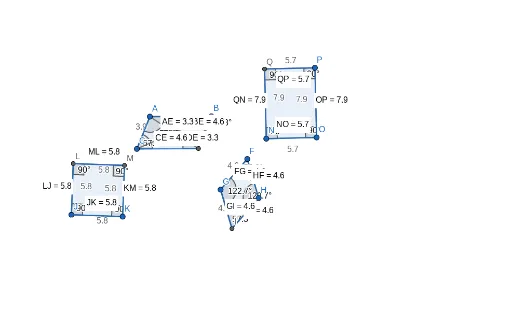
This example demonstrates the construction of a parallelogram, square, rectangle, and rhombus. Key mathematical concepts include parallel lines, perpendicular lines, distance, and angles. Using GeoGebra commands such as Segment, Line, Intersect, and Polygon, the properties of these shapes are visually illustrated. Suitable for middle school and above students to learn geometric construction.
GeoGebra Commands & Parameters
Segment(A, B) → fSegment(A, C) → gLine(C, f) → hLine(B, g) → iIntersect(h, i) → DPolygon(C, A, B, D) → q1, c, a, b, dDistance(g, d) → eAngle(C, D, B) → αAngle(C, A, B) → βAngle(D, C, A) → γAngle(D, B, A) → δSegment(B, C) → jSegment(A, D) → kIntersect(j, k) → EDistance(B, E) → distanceBEDistance(A, E) → distanceAEDistance(D, E) → distanceDEDistance(C, E) → distanceCESegment(F, G) → lCircle(F, G) → pPoint(p) → HSegment(F, H) → mLine(H, l) → nLine(G, m) → qIntersect(n, q) → ISegment(H, I) → rSegment(G, I) → sPolygon(I, G, F, H) → q2, i_1, g_1, f_1, h_1Angle(G, F, H) → εAngle(H, I, G) → ζAngle(F, H, I) → ηAngle(F, G, I) → θSegment(J, K) → tOrthogonalLine(J, t) → j_1OrthogonalLine(K, t) → k_1Circle(J, K) → c_1Intersect(c_1, j_1, 2) → LOrthogonalLine(L, j_1) → l_1Intersect(k_1, l_1) → MSegment(J, L) → m_1Segment(L, M) → n_1Segment(K, M) → p_1Polygon(J, L, M, K) → q3, j_2, l_2, m_2, k_2Distance(H, I) → distanceHIDistance(G, I) → distanceGIDistance(F, G) → distanceFGDistance(H, F) → distanceHFAngle(J, L, M) → ιAngle(J, K, M) → κAngle(L, J, K) → λAngle(K, M, L) → μDistance(m_1, p_1) → oDistance(J, K) → distanceJKDistance(K, M) → distanceKMDistance(M, L) → distanceMLDistance(L, J) → distanceLJSegment(N, O) → q_1OrthogonalLine(N, q_1) → r_1OrthogonalLine(O, q_1) → s_1Point(s_1) → PLine(P, q_1) → t_1Intersect(r_1, t_1) → QSegment(N, Q) → a_1Segment(Q, P) → b_1Segment(P, O) → d_1Angle(N, Q, P) → νAngle(Q, N, O) → ξAngle(O, P, Q) → οAngle(N, O, P) → ρDistance(Q, N) → distanceQNMidpoint(Q, N) →Distance(O, P) → distanceOPMidpoint(O, P) →Distance(N, O) → distanceNOMidpoint(N, O) →Distance(Q, P) → distanceQPMidpoint(Q, P) →Polygon(N, Q, P, O) → q4, n_2, q_2, p_2, o_1
AI Drawing Prompt Reference
Draw a parallelogram first, then construct a square, rectangle, and rhombus. Start by drawing two parallel line segments AB and AC, then draw a line parallel to AC through point B, and another line parallel to AB through point D, intersecting at point D. Connect points A, B, C, and D to form the parallelogram. Measure the lengths and angles to ensure AB=CD, AD=BC, and angle ABC=angle CDA. Next, construct a square by ensuring AB=BC=CD=DA and all angles are right angles. Then, construct a rectangle by ensuring AB=CD, AD=BC, and angle ABC=angle CDA=angle ADC=angle DAB. Finally, construct a rhombus by ensuring AB=BC=CD=DA and angle ABC+angle BCD=180 degrees.
The prompt above was compiled from the original drawing commands and is for reference only.