
Parallelogram Exploration by Andrew Monjaras-Pierson
Loading the math board and drawing, please wait…
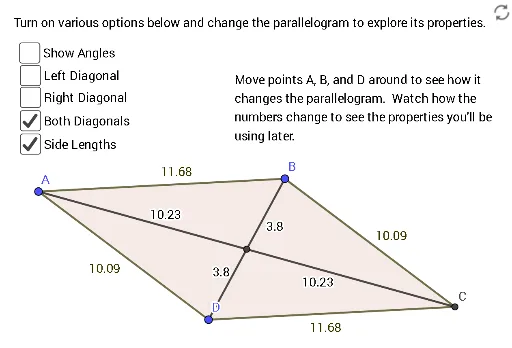
This example demonstrates the properties and construction of a parallelogram. Key mathematical concepts include the definition and properties of a parallelogram, as well as the relationships between angles and side lengths. Using GeoGebra commands such as Line, Intersect, and Polygon, dynamic exploration of various properties of a parallelogram is possible. Suitable for middle school and above students and teachers.
GeoGebra Commands & Parameters
Line(A, D) → fLine(A, B) → gLine(D, g) → hLine(B, f) → iIntersect(h, i) → CPolygon(A, B, C, D) → q1, a, b, c, dAngle(D, A, B) → αAngle(A, B, C) → βAngle(C, D, A) → γAngle(B, C, D) → δLine(B, D) → jLine(A, C) → kIntersect(j, k) → ESegment(A, E) → lSegment(E, B) → mSegment(E, C) → nSegment(E, D) → pAngle(D, A, E) → εAngle(E, A, B) → ζAngle(A, B, E) → ηAngle(E, B, C) → θAngle(B, C, E) → ιAngle(E, C, D) → κAngle(C, D, E) → λAngle(E, D, A) → μSegment(A, C) → qSegment(B, D) → rSegment(A, B) → sSegment(B, C) → tSegment(C, D) → eSegment(D, A) → f_1
AI Drawing Prompt Reference
Draw a parallelogram to demonstrate its properties, including equal opposite sides and angles, and bisecting diagonals. Start by drawing two parallel lines and finding their intersection point. Connect these points to form the parallelogram. Then, label the interior angles and diagonals, showing how the diagonals intersect at the midpoint. Finally, measure and label the angles to verify the sum of interior angles and the properties of the formed triangles.
The prompt above was compiled from the original drawing commands and is for reference only.