
Parallelogram Diagonals Exploration
Loading the math board and drawing, please wait…
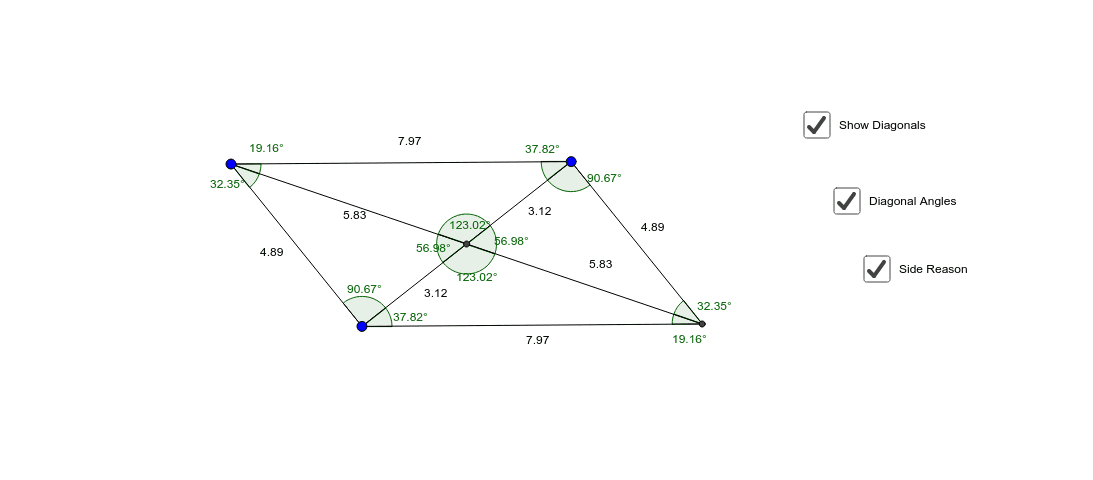
This GeoGebra example dynamically demonstrates that the diagonals of a parallelogram bisect each other and divide the parallelogram into four triangles of equal area. Core mathematical concepts include parallelogram properties, diagonal bisection, congruent triangles, and area ratios. Construction uses Segment commands to create sides, Line commands for diagonals, Intersect to find the diagonal intersection point, and Angle tools to mark relevant angles for congruence observation. Objects include vertices A, B, C, D, sides a, b, c, d, diagonals e, f, and multiple auxiliary segments and angle labels. Suitable for middle school geometry or high school review, allowing students to drag vertices and verify diagonal properties interactively, bridging visual intuition and formal proof.
GeoGebra Commands & Parameters
Segment(A, B) → aLine(C, a) → bSegment(A, C) → cLine(B, c) → dIntersect(b, d) → DSegment(B, D) → eSegment(D, C) → fSegment(A, D) → gSegment(B, C) → hIntersect(g, h) → ESegment(A, E) → iSegment(E, B) → jSegment(D, E) → kSegment(C, E) → lAngle(A, B, E) → αAngle(E, B, D) → βAngle(D, E, B) → γAngle(B, D, E) → δAngle(E, D, C) → εAngle(D, C, E) → ζAngle(E, C, A) → ηAngle(C, A, E) → θAngle(E, A, B) → ιAngle(B, E, A) → κAngle(C, E, D) → λAngle(A, E, C) → μ
AI Drawing Prompt Reference
Draw a parallelogram by connecting adjacent vertices with line segments to form four sides, and connect opposite vertices with straight lines to create two diagonals. Mark the intersection point of the diagonals, then connect this point to each of the four vertices to form four triangles. Measure and label key angles to observe whether the diagonals bisect each other and if the four triangles have equal areas, allowing interactive verification of parallelogram properties.
The prompt above was compiled from the original drawing commands and is for reference only.