
Parallelogram by TBignell
Loading the math board and drawing, please wait…
In collections
Geometry workbook
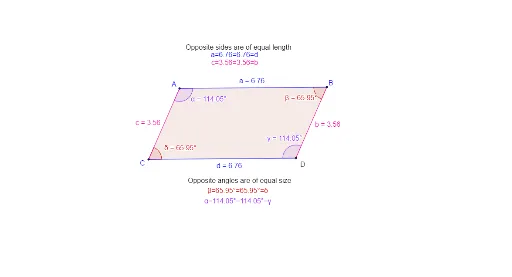
This example demonstrates the construction of a parallelogram. Key mathematical concepts include vectors and polygons. Using GeoGebra commands such as Segment, Line, Intersect, and Polygon, a parallelogram is constructed and its interior angles are observed. Suitable for students in middle school and above for geometric construction.
GeoGebra Commands & Parameters
Segment(A, B) → fLine(C, f) → gSegment(A, C) → hLine(B, h) → iIntersect(g, i) → DPolygon(A, B, D, C) → q1, a, b, d, cInteriorAngles(q1) → α, β, γ, δ
AI Drawing Prompt Reference
Draw a parallelogram by first connecting points A and B to form a segment, then drawing a line through point C and segment AB, next connecting points A and C to form another segment, and drawing a line through point B and segment AC. The intersection of these two lines is point D. Finally, use points A, B, D, and C to draw a quadrilateral and observe its interior angles.
The prompt above was compiled from the original drawing commands and is for reference only.