
Parallelogram Area Demonstration by Guillermo Bautista
Loading the math board and drawing, please wait…
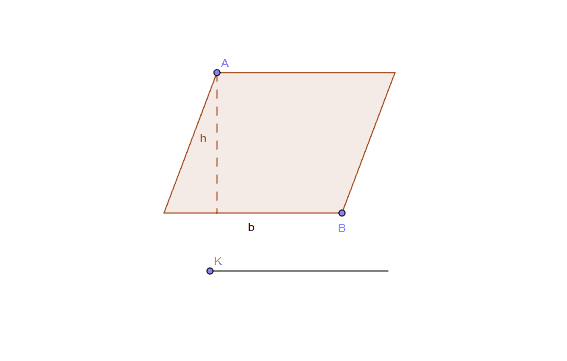
This example demonstrates the proof of the area of a parallelogram. Key mathematical concepts include the properties of parallelograms and area calculation. Using GeoGebra commands such as Intersect, Point, CircleArc, etc., the construction process of the parallelogram is dynamically shown. Suitable for students at junior high school level and above to learn geometric construction and area calculation.
GeoGebra Commands & Parameters
Intersect(xAxis, yAxis) → A_1Point(yAxis) → B_1Point(xAxis) → C_1CircleArc(A_1, C_1, B_1) → cPoint(c) → ASegment(A_1, A) → aRay(A_1, C_1) → bPoint(b) → BLine(B, a) → dLine(A, b) → eIntersect(e, d) → COrthogonalLine(A, b) → fOrthogonalLine(C, b) → gIntersect(f, b) → GIntersect(g, b) → HPolygon(A, G, A_1) → poly1, a_1, d_1, g_1Polygon(A, G, B, C) → poly2, d_2, g_2, e_1, f_1Distance(G, H) → distanceGHPoint(Circle[I, distanceGH]) → JSegment(I, J) → hPoint(h) → KVector(I, K) → uTranslate(A, u) → D'Translate(G, u) → G'Translate(A_1, u) → A'Polygon(D', G', A') → poly1', a', d', g'
AI Drawing Prompt Reference
Draw a parallelogram and demonstrate its area calculation. Start by defining four points A, B, C, and D on the coordinate axes, then construct the parallelogram using these points. Next, draw the height of the parallelogram and use it to calculate the area. Finally, translate points A, G, and A1 to construct another parallelogram, showing that the areas are equal.
The prompt above was compiled from the original drawing commands and is for reference only.