
Parallelogram Angle Problem: Drag Vertices to Find Unknown Angles
Loading the math board and drawing, please wait…
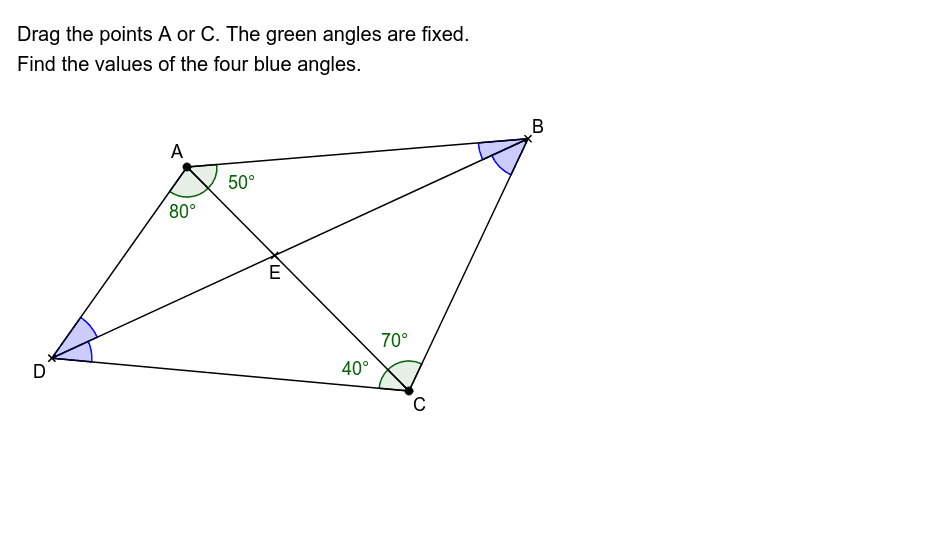
This GeoGebra example demonstrates an interactive parallelogram angle problem where dragging vertices A or C dynamically updates the interior and exterior angles while certain green angles remain fixed. Learners are tasked with finding the values of the four blue angles, reinforcing core geometry concepts such as opposite angles of a parallelogram being equal, consecutive angles being supplementary, triangle angle sum, and angle relationships formed by intersecting rays and segments. The construction uses GeoGebra commands including Rotate, Angle, Ray, Segment, and Intersect, with objects such as points A, B, C, D, E, F, G, H, I and angle labels α, β, γ, δ to build a dynamic, manipulable diagram. Suitable for middle school and high school geometry instruction, classroom exploration, angle calculation practice, and dynamic geometry demonstrations.
GeoGebra Commands & Parameters
Rotate(C, 50*°, A) → GAngle(C, A, G) → α_1Rotate(C, 280*°, A) → HAngle(H, A, C) → β_1Rotate(A, 290*°, C) → IAngle(I, C, A) → γ_1Rotate(A, 40*°, C) → FAngle(A, C, F) → δRay(A, H) → aRay(C, F) → bRay(A, G) → cRay(C, I) → dSegment(A, C) → eIntersect(a, b) → DIntersect(c, d) → BSegment(D, B) → fSegment(A, B) → gSegment(B, C) → hSegment(C, D) → iSegment(D, A) → jAngle(B, D, A) → αAngle(C, D, B) → βAngle(A, B, D) → λAngle(D, B, C) → θIntersect(e, f) → E