
Parallelism Linkage Model
Loading the math board and drawing, please wait…
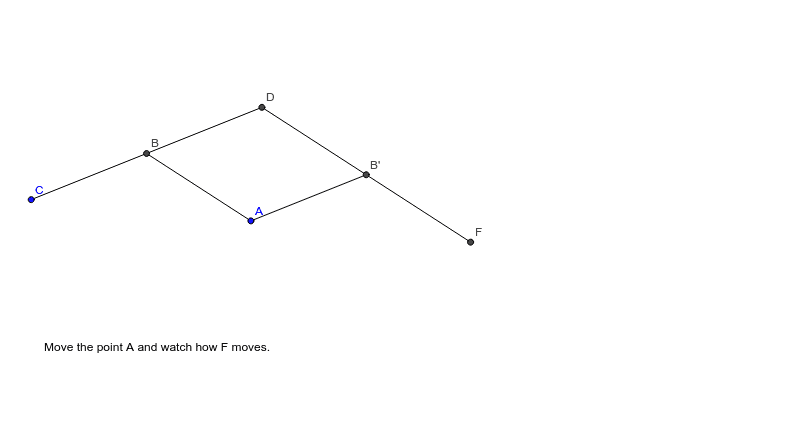
This example demonstrates the mechanical linkage of a pantograph, illustrating the principles of scaling and resizing shapes through dynamic movement. Key mathematical concepts include parallelograms, circumcircles, triangles, midpoints, reflections, and segment constructions. The construction utilizes GeoGebra commands like Circle, Intersect, Line, Midpoint, Mirror, and Segment. Suitable for high school students studying geometric constructions, transformations, and similarity.
GeoGebra Commands & Parameters
Circle(A, 2) → cCircle(C, 2) → eIntersect(c, e, 2) → BLine(C, B) → aCircle(B, 2) → dIntersect(d, a, 2) → DMidpoint(A, D) → EMirror(B, E) → B'Segment(A, B) → bSegment(B, D) → fSegment(D, B') → gSegment(B', A) → hSegment(C, B) → iLine(D, B') → jCircle(B', 2) → kIntersect(k, j, 2) → FLine(B', F) → lLine(B', F) → mSegment(B', F) → n
AI Drawing Prompt Reference
Draw a parallelogram framework where points A and D are the midpoints of the diagonals. First, draw two circles centered at A and C with radius 2, and find their intersection point B. Then, draw line CB. Next, draw a circle centered at B with radius 2, and find its intersection with line CB to get point D. Connect points A and D to get midpoint E. Then, mirror point B about E to get B'. Connect points A and B, B and D, D and B', B' and A, C and B, and B' and F. Finally, draw the line between B' and F.
The prompt above was compiled from the original drawing commands and is for reference only.