
Parallelepiped Volume Experiment
Loading the math board and drawing, please wait…
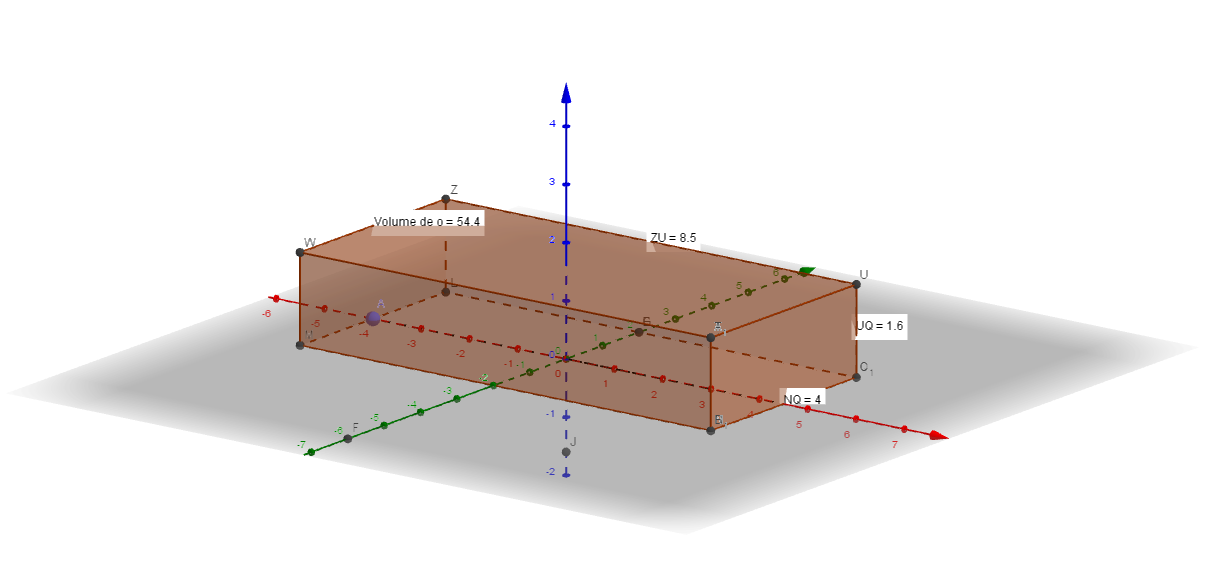
This example demonstrates the calculation and visualization of the volume of a parallelepiped. It involves core mathematical concepts such as volume formulas, spatial geometry, and three-dimensional shapes. Construction highlights include using commands and objects like Point, PointIn, Segment, Sphere, Intersect, Line, Distance, Prism, Volume in GeoGebra to build the parallelepiped and compute its volume. Suitable for high school geometry teaching or self-study to understand volume calculation methods.
GeoGebra Commands & Parameters
Point(xAxis) → APointIn(Sphere[A, 8.5]) → BSegment(A, B) → fPoint(yAxis) → CPointIn(Sphere[C, 4]) → DSegment(C, D) → gSphere(C, D) → aIntersect(yAxis, a, 2) → ESegment(C, E) → hIntersect(yAxis, a) → F, GPoint(h) → HPointIn(Sphere[H, 1.6]) → ISegment(H, I) → iSphere(H, I) → bIntersect(zAxis, b) → J, KLine(C, f) → jLine(G, i) → kLine(A, yAxis) → lLine(B, yAxis) → mIntersect(l, k) → LIntersect(l, j) → MIntersect(j, m) → NIntersect(j, k) → OIntersect(m, xOyPlane) → PIntersect(m, k) → QLine(N, zAxis) → nPointIn(Sphere[N, 1.6]) → RSegment(N, R) → pSphere(N, R) → cIntersect(n, c) → S, TLine(T, j) → qLine(Q, n) → rLine(T, m) → sIntersect(r, s) → UIntersect(n, zAxis) → VLine(M, n) → tLine(T, j) → dIntersect(t, d) → WLine(W, l) → eLine(L, t) → f_1Intersect(e, f_1) → ZLine(Z, k) → g_1Segment(M, N) → h_1Segment(N, Q) → i_1Segment(Q, L) → j_1Segment(M, L) → k_1Segment(M, W) → l_1Segment(L, Z) → m_1Segment(N, T) → n_1Segment(Q, U) → p_1Segment(W, T) → q_1Segment(T, U) → r_1Segment(U, Z) → s_1Segment(Z, W) → t_1Distance(Z, U) → distânciaZUDistance(U, Q) → distânciaUQDistance(N, Q) → distânciaNQPrism(Z, W, M, L, U) → o, A_1, arestaWZ, arestaMW, arestaLM, arestaLZ, arestaUZ, aresta5, aresta2, aresta1, aresta3, aresta6, B_1, aresta7, aresta4, C_1, faceLMWZ, face4, face3, face1, face2, face5Volume(o) → volumeoPoint(o) → Pontoo
AI Drawing Prompt Reference
Draw a parallelepiped by first determining three non-collinear points and connecting them to form a parallelogram base. Extend perpendicular lines from each vertex of the base upward to define the corresponding vertices of the top face, then connect the corresponding edges of the top and bottom faces to complete the shape. Calculate and visualize the volume by multiplying the base area by the height, and label the relevant calculation steps and geometric relationships in the diagram to demonstrate spatial geometry and volume calculation methods.
The prompt above was compiled from the original drawing commands and is for reference only.