
Parallel & Perpendicular Lines in the Coordinate Plane
Loading the math board and drawing, please wait…
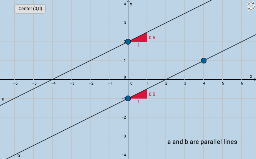
① This interactive GeoGebra example demonstrates the properties of parallel and perpendicular lines drawn in the coordinate plane, allowing students to explore the relationship between slopes dynamically. ② Core mathematical concepts include the slope of a line, the condition for parallelism (equal slopes), and the condition for perpendicularity (product of slopes equals -1), all within the context of coordinate geometry. ③ Construction details: The example uses the Point command to create points A, B, C, the Line command to construct lines f, a, b, and the Slope command to compute slopes m and m_1. Text objects text1 and text2 display the slope values, and a button (button1) provides interactive control, enabling users to drag points and observe changes in slopes. ④ This resource is suitable for middle school or early high school students learning analytic geometry, and serves as a quick discovery activity with key questions to guide exploration.
GeoGebra Commands & Parameters
Point(f) → APoint(f) → BLine(A, C) → bLine(B, b) → aSlope(b) → mSlope(a) → m_1
AI Drawing Prompt Reference
Draw a coordinate plane with a base line. Place two arbitrary points on this line. From one point, draw a slanted line to another location in the plane. From the second point, draw a line parallel to the slanted line. Display the slopes of both the slanted line and the parallel line as numeric labels near them. Include interactive controls such as draggable points or a button so that when the user moves points, the slope values update, showing that parallel lines have equal slopes and perpendicular lines have slopes whose product is -1. The figure should include axes, lines, points, slope labels, and interactive elements.
The prompt above was compiled from the original drawing commands and is for reference only.