
Parabolic Arc in Tulip
Loading the math board and drawing, please wait…
In collections
Modeling real life with parabola
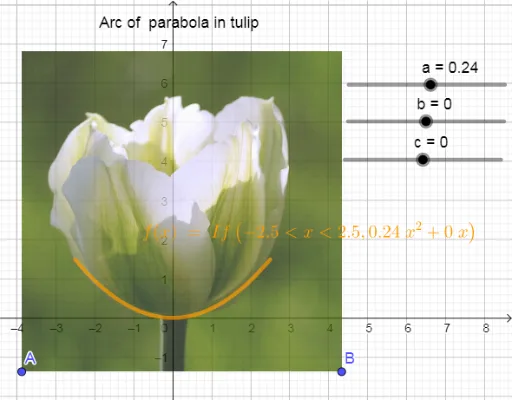
This example demonstrates how to draw a parabolic arc within a tulip shape. It involves core mathematical concepts such as functions, coordinate geometry, and parametric equations. The construction utilizes GeoGebra objects and commands: points A, B, image pic1, variables a, b, c, function f, and text1. It is suitable for high school mathematics education, illustrating the combination of function graphs and geometric shapes, and helping students understand the application of parametric equations and coordinate geometry.
GeoGebra Commands & Parameters
Point A(-3.864, -1.38)Point B(4.3296, -1.38)Numeric a(0.24)Numeric b(0)Numeric c(0)f(x) = If[-2.5 < x < 2.5, (a * x^(2)) + (b * x) + c]
AI Drawing Prompt Reference
Draw a parabolic arc within a tulip shape, showcasing the combination of function graphs and geometric forms. First, establish two points aligned horizontally, one on the left and one on the right. Then, define a parabolic function with its domain limited between these points to ensure the graph appears as an arc. Finally, plot this arc inside the tulip shape to illustrate the integration of functions and geometry.
The prompt above was compiled from the original drawing commands and is for reference only.