
Parabola on a Satellite Dish
Loading the math board and drawing, please wait…
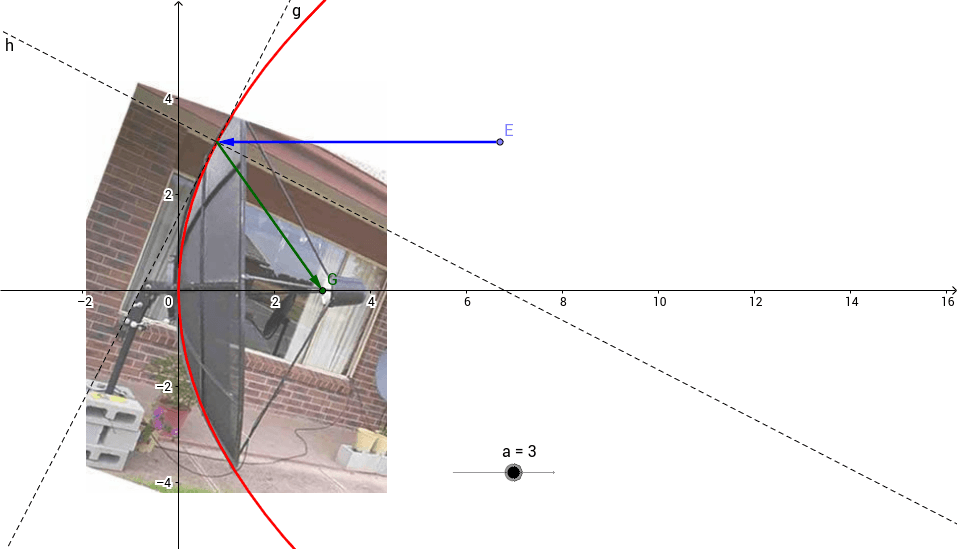
This example demonstrates the parabola y²=4ax and allows the parameter a to be varied dynamically using a slider. It covers core math concepts like standard parabola equation, coordinate geometry, and the effect of parameter changes on the curve. Construction highlights include commands like OrthogonalLine, Point, Intersect, Tangent, Mirror, and Vector from GeoGebra. Ideal for high school geometry and calculus students exploring parabolic properties.
GeoGebra Commands & Parameters
OrthogonalLine(A, yAxis) → bPoint(b) → BOrthogonalLine(A, xAxis) → dPoint(d) → CPoint(xAxis) → DOrthogonalLine(D, xAxis) → ePoint(e) → EOrthogonalLine(E, yAxis) → fIntersect(c, f) → F,Tangent(F, c) → g,OrthogonalLine(F, g) → hMirror(f, h) → f'Vector(E, F) → uIntersect(xAxis, f') → GVector(F, G) → v
AI Drawing Prompt Reference
Draw a parabola with the equation y²=4ax, allowing the parameter a to be dynamically adjusted using a slider. Start by drawing a line perpendicular to the y-axis through a point on the parabola, intersecting the y-axis at a point. Then draw a line perpendicular to the x-axis through this point, intersecting the x-axis at another point. Next, draw a line perpendicular to the x-axis through a point on the x-axis, intersecting the y-axis at a point. Then draw a line perpendicular to the y-axis through this point, intersecting the parabola at a point. From this point, draw the tangent to the parabola and a line perpendicular to this tangent. Use reflection and vector tools in conjunction with the parabola and coordinate axes to construct the desired figure.
The prompt above was compiled from the original drawing commands and is for reference only.