
Parabola Geometric Construction
Loading the math board and drawing, please wait…
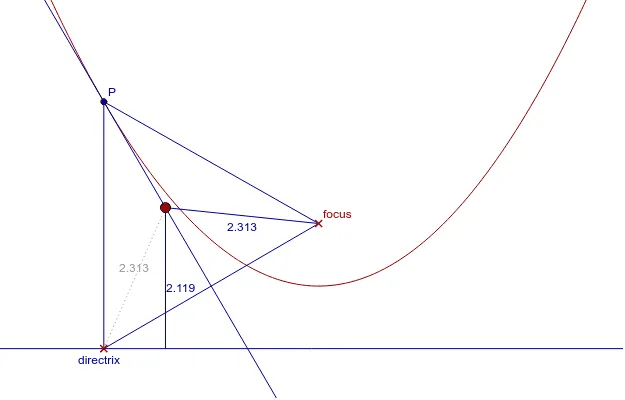
This example demonstrates the geometric properties of a parabola. Key mathematical concepts include the definition of a parabola, its focus, and directrix. Using GeoGebra commands such as Point, Line, LineBisector, and OrthogonalLine, the construction of a parabola is illustrated. Suitable for high school mathematics education and learning.
GeoGebra Commands & Parameters
Point(xAxis) → APoint(xAxis) → BLine(A, B) → directrixPoint(yAxis) → FPoint(directrix) → DLineBisector(D, F) → bisectorOrthogonalLine(D, directrix) → perpendicularIntersect(bisector, perpendicular) → PSegment(P, D) → d_1Segment(P, F) → d_2LineBisector(F, D) → aPoint(a) → COrthogonalLine(C, directrix) → bIntersect(directrix, b) → ESegment(C, E) → cSegment(C, F) → dSegment(D, F) → eIntersect(a, e) → GPoint(perpendicular) → HRay(P, H) → gPoint(a) → ISegment(F, D) → hSegment(D, P) → iSegment(D, C) → j
AI Drawing Prompt Reference
Draw a parabola by first taking two points A and B on the x-axis and connecting them as the directrix. Take point F on the y-axis as the focus, and take point D on the directrix. Construct the angle bisector and perpendicular line of D and F, and let their intersection point P be a point on the parabola. Connect PF and PD, construct the perpendicular line of PF and let it intersect the directrix at E, connect CE and construct the perpendicular line of CE and let it intersect the directrix at F, connect DF and construct the angle bisector of DF and let it intersect PF at G, connect PG and construct the perpendicular line of PG and let it intersect the directrix at H, connect PH and construct the perpendicular line of PF and let it intersect the directrix at I, connect FI and connect ID, connect DF.
The prompt above was compiled from the original drawing commands and is for reference only.