
Parabola–Circle Configuration: Using Area and Integration to Encode a Geometric
Loading the math board and drawing, please wait…
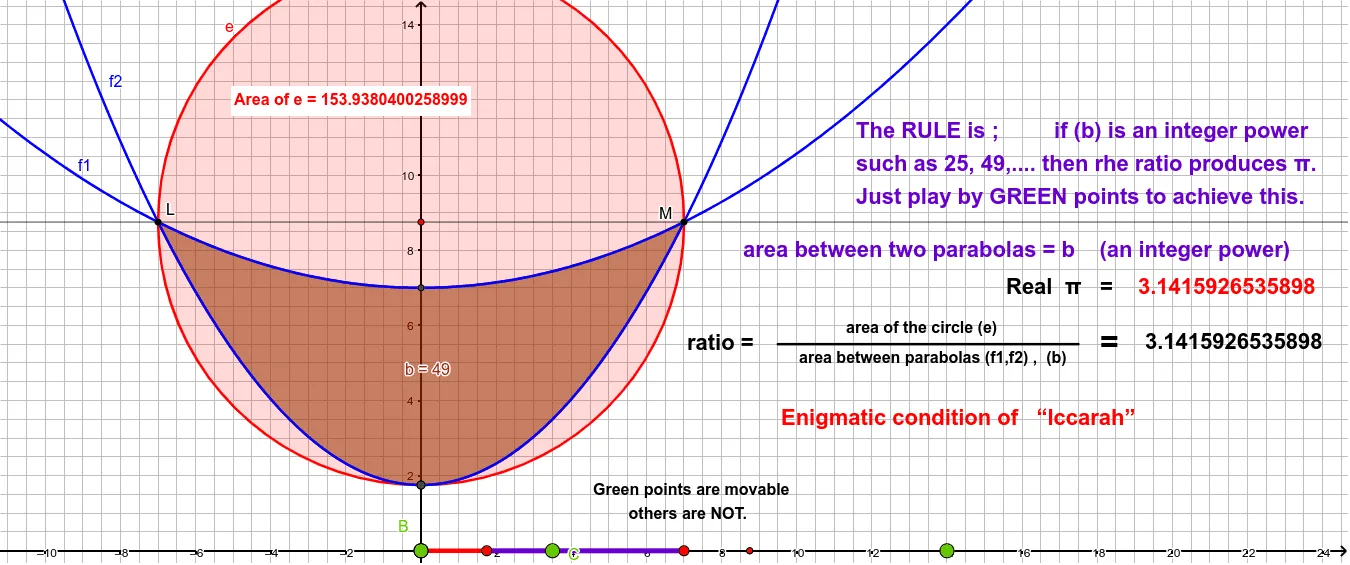
This example demonstrates how to set up a coupled geometry scene where a parabola and a circle intersect, and then use region area and integration to characterize an “enigmatic” geometric condition. It centers on core ideas such as constructing a parabola, constructing circles (including circumcircle/circumscribed circle style objects), using orthogonal lines to impose perpendicular constraints, finding key points via intersection, and measuring the enclosed region via IntegralBetween and Area. The construction is implemented with GeoGebra commands: Point, Parabola, Circle/Circumference to build the curves; OrthogonalLine and Intersect to generate constrained points; Segment to form boundaries; and then IntegralBetween and Area to compute the integral value over the relevant interval and the corresponding area. The model uses named intersection/auxiliary points (e.g., A, B, C, D, E, etc.) and circle-related objects (e.g., circle_1, Pointcirclee_1) to drive the construction. Suitable for high school advanced geometry-to-calculus connections and for classroom demonstrations or contest-oriented explorations that combine geometry construction with measurement and integral reasoning.
GeoGebra Commands & Parameters
Point(xAxis) → AParabola(A, yAxis) → cPoint(xAxis) → BOrthogonalLine(B, xAxis) → fPoint(xAxis) → CParabola(C, f) → dIntersect(d, c) → D, E, ,OrthogonalLine(D, xAxis) → gIntersect(g, xAxis) → FCircle(F, D) → circle_{1}PointIn(circle_{1}) → Pointcirclee_{1}Intersect(d, xAxis, 1) → GIntersect(c, xAxis, 1) → HSegment(G, H) → hIntersect(xAxis, yAxis) → JIntersect(g, xAxis) → IIntersect(g, xAxis) → KSegment(B, G) → iIntersect(f1, f2) → L, MOrthogonalLine(L, yAxis) → jIntersect(j, yAxis) → NCircle(N, L) → eCircumference(e) → aPointIn(e) → PointcircleeIntersect(f1, yAxis, 1) → PIntersect(f2, yAxis, 1) → QIntegralBetween(f1(x), f2(x), X1, X2) → bIntersect(e, yAxis, 1) → RArea(e) → lPointIn(e) → PointeSegment(S, T) → k
AI Drawing Prompt Reference
Draw a parabola intersecting a line, then draw a circle centered at the intersection point such that it is tangent to the parabola. Next, draw another parabola perpendicular to the initial line and find its intersection points with the first parabola. Use these points to draw a vertical line and a circle centered at its intersection with the x-axis. Finally, calculate the area and integral of the region enclosed by the two parabolas.
The prompt above was compiled from the original drawing commands and is for reference only.