
Pair of Straight Lines in Double Cone
Loading the math board and drawing, please wait…
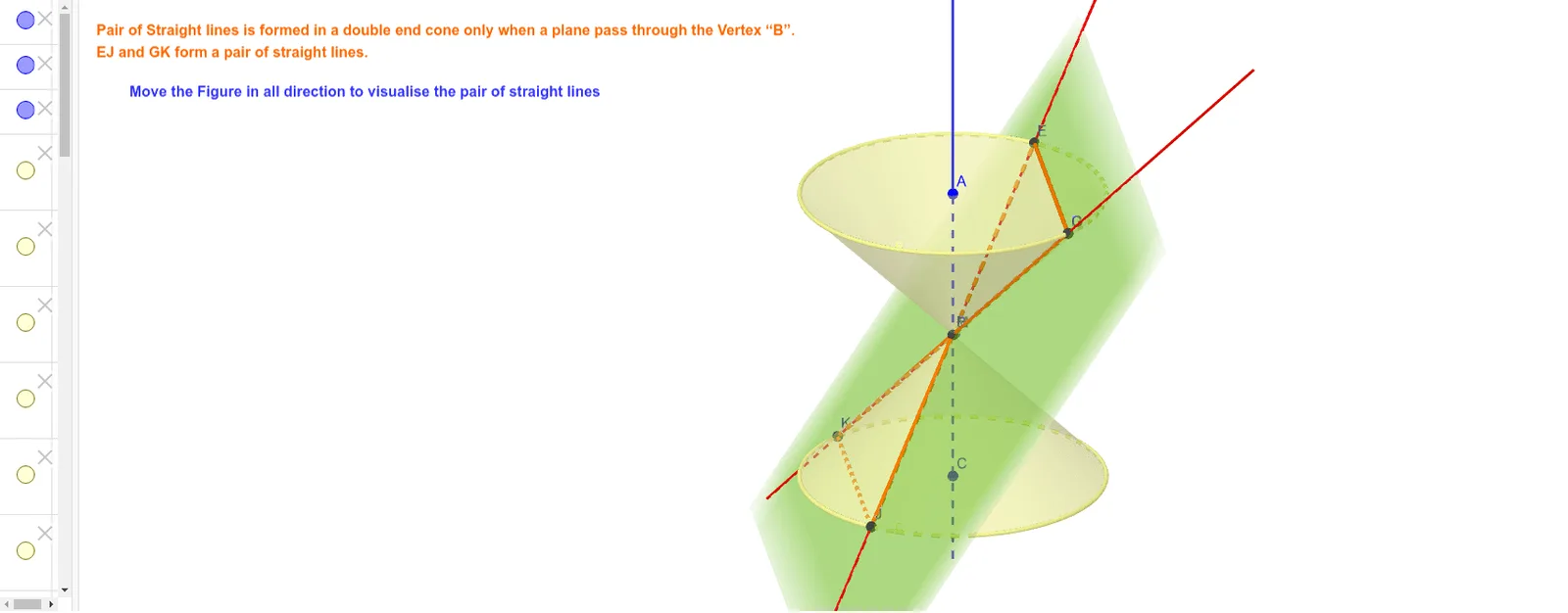
This example demonstrates the formation and properties of a pair of straight lines within a double cone, integrating concepts like conic sections, line intersections, quadratic functions, and definite integrals. The construction utilizes GeoGebra commands such as Cone, Line, Point, Plane, IntersectPath, and Corner. It is suitable for high school and advanced learners exploring the intersection of spatial geometry and analytical geometry.
GeoGebra Commands & Parameters
Cone(C, B, 3) → a, c, bCone(A, B, 3) → d, e, fLine(A, C) → gPoint(e) → DPoint(e) → EPlane(D, E, B) → hIntersectPath(h, d) → kCorner(k) → F, G, H, IIntersectPath(h, a) → pCorner(p) → J, K, L, MLine(E, J) → iLine(G, K) → j
AI Drawing Prompt Reference
Inside a double cone, draw two intersecting lines to show their intersection with the cone. First, construct two cones, then draw a line connecting their apexes. Use two points on this line and another apex to define a plane. Next, find the intersections of this plane with both cones, extend these lines to meet the cone surfaces, and finally connect these intersection points to form a pair of clear straight lines.
The prompt above was compiled from the original drawing commands and is for reference only.