
Painted Faces of a Cube
Loading the math board and drawing, please wait…
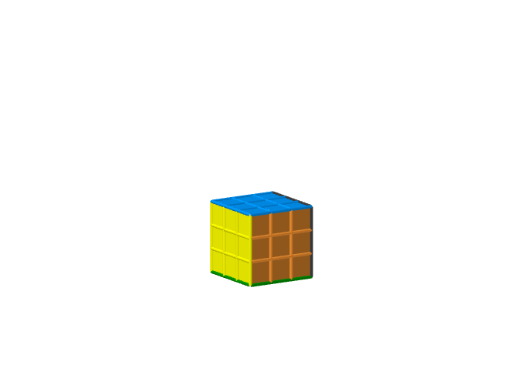
This example demonstrates the visualization of a cube with painted faces, involving concepts like area, volume, polygons, functions, coordinate geometry, and solid geometry. It uses GeoGebra commands such as Sequence, Sort, Remove, Element, RemoveUndefined, and Flatten to construct the model. Suitable for high school and above, it helps in understanding surface properties and function relationships in geometry.
GeoGebra Commands & Parameters
Sequence(Sequence[Sequence[Point[{i, j, k}], i, ((-n)) / 2, n / 2 - 1], j, ((-n)) / 2, n / 2 - 1], k, ((-n)) / 2, n / 2 - 1) → originPointsSort(Flatten[Join[{{{Sequence[{(n * i) + 1, (n * (i + 1))}, i, 1, n - 2], Sequence[n^(3) + 1 - {(n * i) + 1, (n * (i + 1))}, i, 1, n - 2]}, Sequence[Sequence[i, i, Element[threeFaces, k] + 1, Element[threeFaces, k + 1] - 1], k, 1, Length[threeFaces], 2]}, Sequence[{(i * n^(2)) + 1, (i * n^(2)) + n, ((i + 1) * n^(2)) - n + 1, ((i + 1) * n^(2))}, i, 1, n - 2]}]]) → twoFacesSort(Flatten[Sequence[Sequence[Sequence[{(k * n^(2)) + (i * n) + j}, k, 1, n - 2], i, 1, n - 2], j, 2, n - 1]]) → noFacesRemove(Sequence[i, i, 1, n^(3)], Flatten[Join[{noFaces, twoFaces, threeFaces}]]) → oneFaceElement({noFaces, oneFace, twoFaces, threeFaces, Sequence[i, i, 1, n^(3)]}, i + 1) → keepTheseCubesElement({{}, KeepIf[x ≤ n^(2), oneFace], KeepIf[x ≤ n^(2), twoFaces], KeepIf[x ≤ n^(2), threeFaces], Sequence[i, i, 1, n^(2)]}, i + 1) → keepTheseColorsRemoveUndefined(Flatten[Sequence[Sequence[Element[spacedPoints, i + j], i, 1, n], j, 0, Length[spacedPoints], n^(2)]]) → frontPointsSequence(Element[Sequence[Polygon[Element[backPoints, i], Element[backPoints, i] + (1, 0, 0), Element[backPoints, i] + (1, 0, 1), Element[backPoints, i] + (0, 0, 1)], i, 1, Length[backPoints]], Element[keepTheseColors, j]], j, 1, Length[keepTheseColors]) → backSequence(Element[spacedPoints, i], i, 1, n^(3), n) → leftPointsFlatten(First[spacedPoints, n^(2)]) → bottomPointsSequence(Element[Sequence[Polygon[Element[frontPoints, i], Element[frontPoints, i] + (1, 0, 0), Element[frontPoints, i] + (1, 0, 1), Element[frontPoints, i] + (0, 0, 1)], i, 1, Length[frontPoints]], Element[keepTheseColors, j]], j, 1, Length[keepTheseColors]) → frontSequence(Element[Sequence[Polygon[Element[rightPoints, i], Element[rightPoints, i] + (0, 1, 0), Element[rightPoints, i] + (0, 1, 1), Element[rightPoints, i] + (0, 0, 1)], i, 1, Length[rightPoints]], Element[keepTheseColors, j]], j, 1, Length[keepTheseColors]) → rightSequence(Element[Sequence[Polygon[Element[topPoints, i], Element[topPoints, i] + (1, 0, 0), Element[topPoints, i] + (1, 1, 0), Element[topPoints, i] + (0, 1, 0)], i, 1, Length[topPoints]], Element[keepTheseColors, j]], j, 1, Length[keepTheseColors]) → topSequence(Element[Sequence[Polygon[Element[bottomPoints, i], Element[bottomPoints, i] + (1, 0, 0), Element[bottomPoints, i] + (1, 1, 0), Element[bottomPoints, i] + (0, 1, 0)], i, 1, Length[bottomPoints]], Element[keepTheseColors, j]], j, 1, Length[keepTheseColors]) → bottomSequence(Element[Sequence[Polygon[Element[leftPoints, i], Element[leftPoints, i] + (0, 1, 0), Element[leftPoints, i] + (0, 1, 1), Element[leftPoints, i] + (0, 0, 1)], i, 1, Length[leftPoints]], Element[keepTheseColors, j]], j, 1, Length[keepTheseColors]) → leftSequence(Element[Sequence[Cube[Element[spacedPoints, i], Element[spacedPoints, i] + (1, 0, 0), Element[spacedPoints, i] + (1, 1, 0)], i, 1, Length[spacedPoints]], Element[keepTheseCubes, j]], j, 1, Length[keepTheseCubes]) → allSmallCubes
AI Drawing Prompt Reference
Draw a cube with painted faces, where each face has a different color determined by calculating and sorting the positions of points. Start by constructing the basic structure of the cube, then add colors to each face, and finally combine all the small cubes to display the overall effect of the cube.
The prompt above was compiled from the original drawing commands and is for reference only.