
p4g Geometric Transformation
Loading the math board and drawing, please wait…
In collections
Symmetry, Transformation and Tessellation
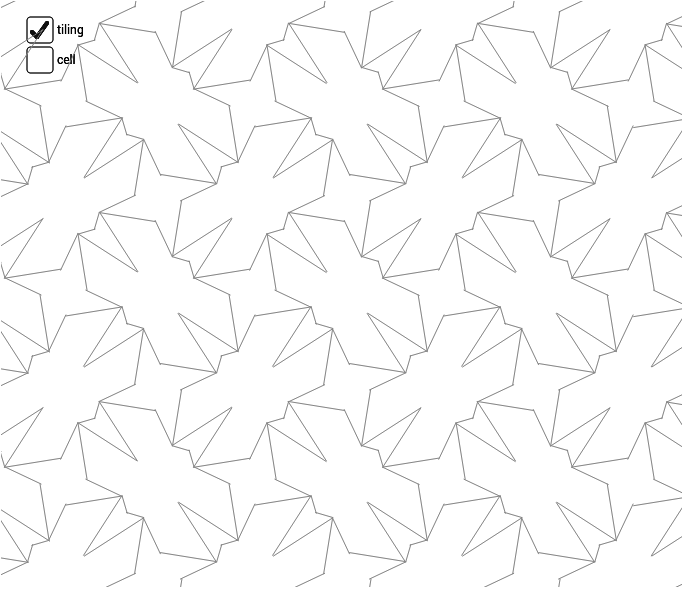
This example demonstrates p4g symmetry transformations, involving key mathematical concepts such as geometric transformations and matrices. Using GeoGebra commands like Midpoint, Vector, Segment, Mirror, and Rotate, complex geometric shapes are constructed. Suitable for high school mathematics education and learning, especially for topics on geometric transformations and matrix transformations.
GeoGebra Commands & Parameters
Midpoint(A, B) → EMidpoint(B, D) → FMidpoint(D, C) → GMidpoint(C, A) → HMidpoint(C, B) → IVector(A, B) → uVector(A, C) → vVector(C, D) → wVector(B, D) → aSegment(H, F) → bSegment(E, G) → cSegment(J, K) → eSegment(K, L) → fSegment(K, M) → gSegment(K, N) → hSegment(H, E) → jMirror(cell1a, j) → cell1bRotate(cell1, 90*°, I) → cell2Rotate(cell1, 180*°, I) → cell3Rotate(cell1, 270*°, I) → cell4Sequence(Translate[Sequence[Translate[tile, Vector[(n * u)]], n, -3, 3], Vector[(m * v)]], m, -3, 3) → tilingLine(H, E) → lLine(E, F) → mLine(F, G) → nLine(G, H) → pLine(A, D) → qLine(C, B) → rLineBisector(C, G) → sLineBisector(G, D) → tLineBisector(C, H) → a_1LineBisector(H, A) → b_1
AI Drawing Prompt Reference
Draw a square ABCD, then construct its diagonals using midpoints E, F, G, H. Draw vectors u, v, w, a. Use midpoints and vectors to draw segments b, c, e, f, g, h, j. Perform mirror and rotation operations to get cell1b, cell2, cell3, cell4. Finally, use translation to generate the tiling pattern tiling.
The prompt above was compiled from the original drawing commands and is for reference only.