
Overly Perfect Rhombus
Loading the math board and drawing, please wait…
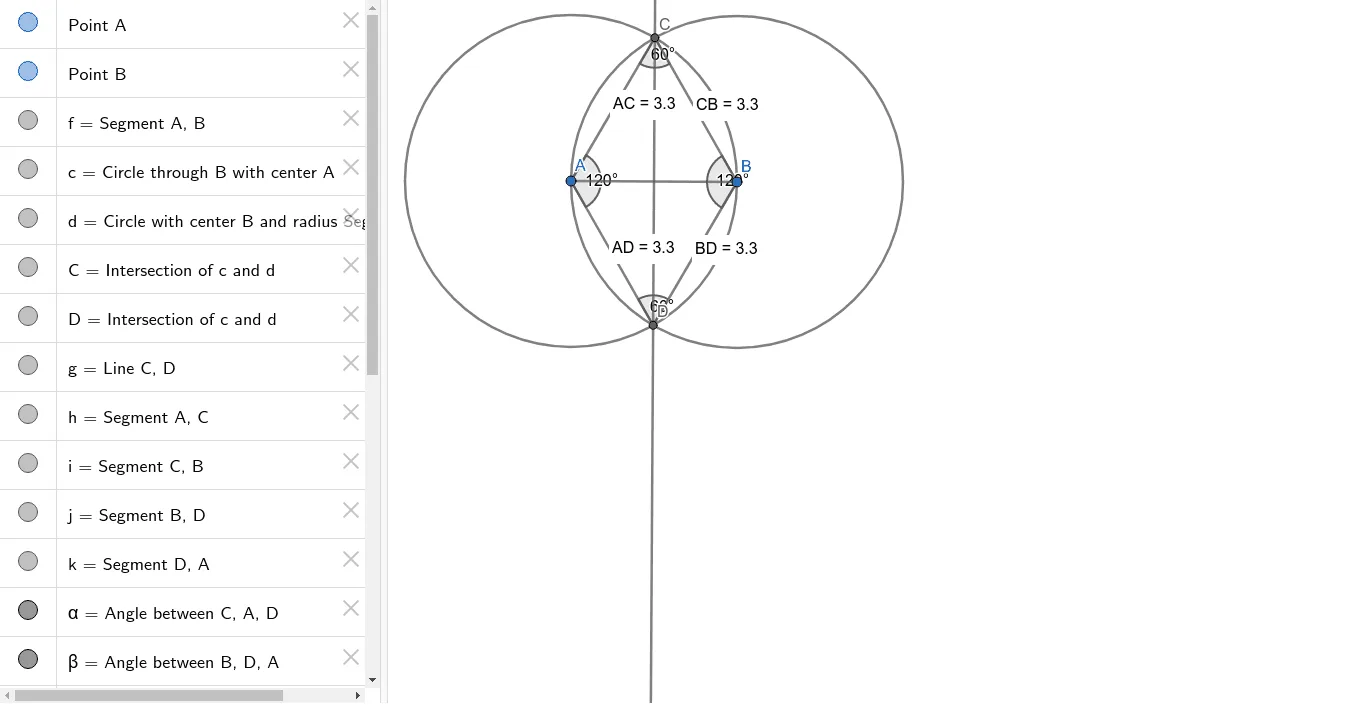
This example demonstrates an overly perfect rhombus, dynamically constructing its geometric properties and symmetry. Core math concepts include polygons, angles, distance measurement, coordinate geometry, and optimization problems. Construction highlights involve commands like Segment, Circle, Intersect, Line, Angle, and Distance in GeoGebra. Suitable for high school and above learners to explore geometric constructions, optimization, and data analysis.
GeoGebra Commands & Parameters
Segment(A, B) → fCircle(A, B) → cCircle(B, Segment[B, A]) → dIntersect(c, d, 1) → CIntersect(c, d, 2) → DLine(C, D) → gSegment(A, C) → hSegment(C, B) → iSegment(B, D) → jSegment(D, A) → kAngle(C, A, D) → αAngle(B, D, A) → βAngle(A, C, B) → γAngle(C, B, D) → δDistance(A, C) → distanceACDistance(C, B) → distanceCBDistance(A, D) → distanceADDistance(B, D) → distanceBD
AI Drawing Prompt Reference
Draw a rhombus by intersecting two line segments, then draw circles with each segment as diameter. The intersection points of the circles form the vertices of the rhombus. Connect these points to complete the shape, and label the angles and side lengths to highlight its symmetry and geometric properties.
The prompt above was compiled from the original drawing commands and is for reference only.