
Outfit Selection Probability
Loading the math board and drawing, please wait…
In collections
Arbeiten mit Baumdiagrammen
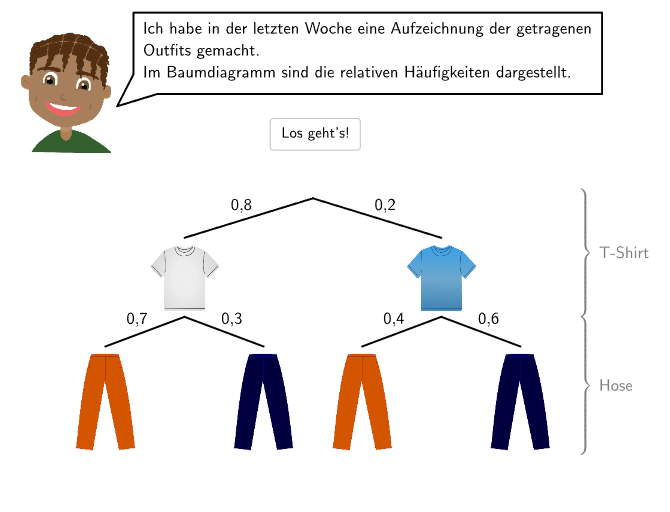
This example demonstrates probability calculations for analyzing outfit combination choices. Core math concepts include probability & statistics, specifically relative frequency calculation. Construction involves GeoGebra commands like Sequence, Element, Textfield, Join, PolyLine, Segment, If, etc. Suitable for 5-6th grade students learning permutation combinations and probability statistics.
GeoGebra Commands & Parameters
Sequence(Random[1, 10], i, 1, 10) → randomNumbers, {3, 3, 2, 2, 3, 4, 10, 7, 6, 6}Element(randomNumbers, Mod[questionCount, Length[randomNumbers]] + 1) → randomNumberTextfield(input) → inputBoxJoin({Sequence[Segment[Corner[4] + (RasterPixMat * ((k * RasterStepXY), 0)), Corner[4] + (RasterPixMat * ((k * RasterStepXY), RasterMaxY))], k, 0, RasterMaxX / RasterStepXY], Sequence[Segment[Corner[4] + (RasterPixMat * (0, (k * RasterStepXY))), Corner[4] + (RasterPixMat * (RasterMaxX, (k * RasterStepXY)))], k, 0, RasterMaxY / RasterStepXY]}) → RasterStreckenJoin({Sequence[Text[UnicodeToLetter[65 + k], Midpoint[Corner[4] + (RasterPixMat * ((k * RasterStepXY), RasterMaxY)), Corner[4] + (RasterPixMat * (((k + 1) * RasterStepXY), RasterMaxY))], false, true, 0, -1], k, 0, RasterMaxX / RasterStepXY - 1], Sequence[Text[("" * k), Midpoint[Corner[4] + (RasterPixMat * (RasterMaxX, ((k - 1) * RasterStepXY))), Corner[4] + (RasterPixMat * (RasterMaxX, (k * RasterStepXY)))], false, true, 1, 0], k, 1, RasterMaxY / RasterStepXY]}) → RasterBeschriftungSequence(Sequence[Corner[4] + (RasterPixMat * ((k * RasterStepXY), (m * RasterStepXY))), k, 0, RasterMaxX / RasterStepXY], m, 0, RasterMaxY / RasterStepXY) → RasterPunktePolyLine(PosSB, Corner[txt011, 1] + (0.5, 0), Corner[txt011, 2] + (0.1, 0), Corner[txt011, 3] + (0.1, 0.1), Corner[txt011, 4] + (-0.1, 0.1), Corner[txt011, 1] + (-0.1, 0.5), PosSB) → sb01Segment(Pos01, Pos11) → seg11Segment(Pos01, Pos12) → seg12Segment(Pos11 + (0, (-dis)), Pos21) → seg21Segment(Pos11 + (0, (-dis)), Pos22) → seg22Segment(Pos12 + (0, (-dis)), Pos23) → seg23Segment(Pos12 + (0, (-dis)), Pos24) → seg24PolyLine(PosSB, Corner[txt021, 1] + (-0.1, 0.5), Corner[txt021, 1] + (-0.1, -0.1), Corner[txt021, 2] + (0.1, -0.1), Corner[txt021, 3] + (0.1, 0.1), Corner[txt021, 4] + (-0.1, 0.1), Corner[txt021, 1] + (-0.1, 1.2), PosSB) → sb02PolyLine(PosSB, Corner[txt031, 1] + (0.5, 0), Corner[txt031, 2] + (0.1, 0), Corner[txt031, 3] + (0.1, 0.1), Corner[txt031, 4] + (-0.1, 0.1), Corner[txt031, 1] + (-0.1, 0.5), PosSB) → sb031PolyLine(PosSB, Corner[txt031, 1] + (-0.1, 0.5), Corner[txt031, 1] + (-0.1, -0.1), Corner[txt031, 2] + (0.1, -0.1), Corner[txt031, 3] + (0.1, 0.1), Corner[txt031, 4] + (-0.1, 0.1), Corner[txt031, 1] + (-0.1, 1.2), PosSB) → sb032PolyLine(PosSB, Corner[txt041, 1] + (0.5, 0), Corner[txt041, 2] + (0.1, 0), Corner[txt041, 3] + (0.1, 0.1), Corner[txt041, 4] + (-0.1, 0.1), Corner[txt041, 1] + (-0.1, 0.5), PosSB) → sb04Textfield(input021) → InputBox021Textfield(input022) → InputBox022Textfield(input031) → InputBox031Textfield(input032) → InputBox032If(step ≟ 2, correct021 ∧ correct022, step ≟ 3, correct031 ∧ correct032, true) → clickableBtnNextTextfield(input041) → InputBox041Textfield(input042) → InputBox042Textfield(input043) → InputBox043Textfield(input044) → InputBox044Textfield(input045) → InputBox045
AI Drawing Prompt Reference
This is a graphic for outfit selection probability analysis, featuring a grid with randomly distributed numbers and letter labels, some points, line segments connecting points to grid lines, and rectangular polygons. Input boxes are also included for data entry. The layout resembles a table, making it easy to visually present probability calculations for outfit combinations.
The prompt above was compiled from the original drawing commands and is for reference only.