
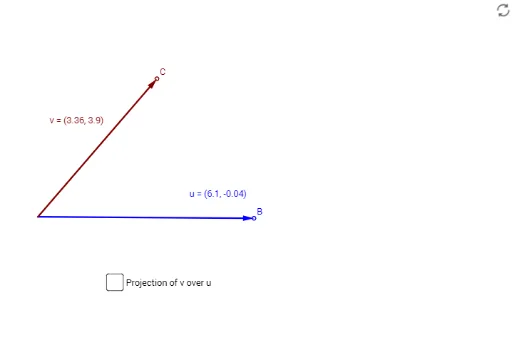
Orthogonal projection of v over u
Loading the math board and drawing, please wait…
In collections
MTH-5173-2-St. Lawrence Seaway
This example demonstrates the orthogonal projection of vector v onto vector u in a two-dimensional space. The core mathematical concepts involved include vectors, orthogonal projection, and two-dimensional vector operations. The construction highlights the use of GeoGebra commands and objects such as Intersect (intersection), Line (line), Vector (vector), OrthogonalLine (orthogonal line), and Segment (segment). It is suitable for high school students learning about vectors and geometry, helping them understand the geometric significance and calculation methods of vector projection.
GeoGebra Commands & Parameters
Intersect(xAxis, yAxis) → ALine(B, A) → iVector(A, B) → uOrthogonalLine(C, u, xOyPlane) → fVector(A, C) → vIntersect(i, f) → DVector(A, D) → ProjectionSegment(C, D) → h
AI Drawing Prompt Reference
In a two-dimensional space, draw the intersection point of the x-axis and y-axis, then draw a line from the intersection point along the x-axis, and draw a vector from the intersection point upwards to represent vector u. Next, draw a vector from the origin to represent vector v, and draw a line perpendicular to vector u. This perpendicular line intersects the previously drawn line at a point. Draw a vector from the origin to this intersection point to represent the projection, and finally, draw a line segment connecting the starting point of vector v to the endpoint of the projection.
The prompt above was compiled from the original drawing commands and is for reference only.