
Ordering Integers on a Number Line
Loading the math board and drawing, please wait…
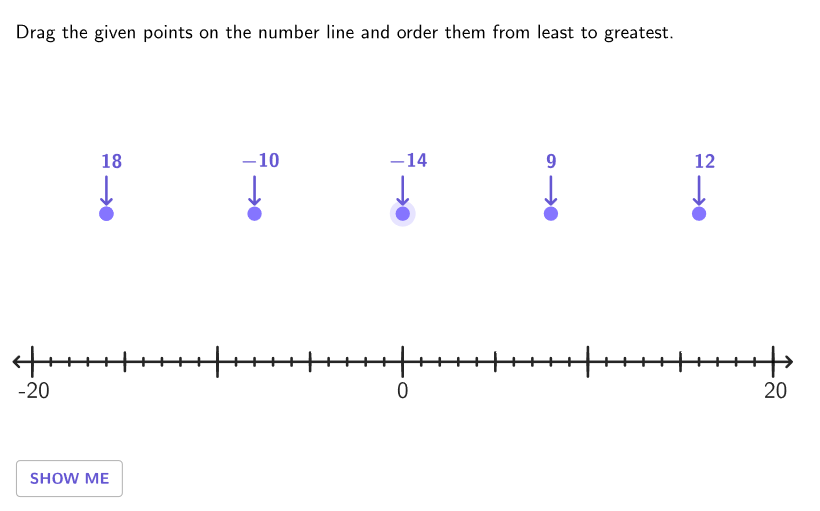
This example demonstrates how to arrange positive and negative integers on a number line from least to greatest. The key math concepts involve comparing and ordering integers. Construction uses GeoGebra commands like KeepIf, Shuffle, Sort, and others to manage integer objects. Suitable for grades 6-8 in math education to develop number sense.
GeoGebra Commands & Parameters
KeepIf(y(P) ≠ 0, P, allPoints) → allOffPointsShuffle(Join[{Sequence[t, t, -18, -3, 4], Sequence[t, t, 0, 18, 3]}]) → valAList, {12, -10, 6, 18, -14, -18, 9, -6, 0, 15, 3}Element(valAList, Mod[valCount, Length[valAList]] + 1) → valAShuffle(Join[{Sequence[t, t, -18, -3, 4], Sequence[t, t, 0, 18, 3]}] \ {valA}) → valBList, {-18, 0, 15, -14, -10, 6, 12, -6, 3, 9}Element(valBList, Mod[valCount, Length[valBList]] + 1) → valBShuffle(Join[{Sequence[t, t, -18, -3, 4], Sequence[t, t, 0, 18, 3]}] \ {valA, valB}) → valCList, {-6, 3, 15, 6, 0, -14, 12, -18, 9}Element(valCList, Mod[valCount, Length[valCList]] + 1) → valCShuffle(Join[{Sequence[t, t, -18, -3, 4], Sequence[t, t, 0, 18, 3]}] \ {valA, valB, valC}) → valDList, {6, 0, -18, 15, 3, 12, 9, -6}Element(valDList, Mod[valCount, Length[valDList]] + 1) → valDShuffle(Join[{Sequence[t, t, -18, -3, 4], Sequence[t, t, 0, 18, 3]}] \ {valA, valB, valC, valD}) → valEList, {12, 0, -18, 6, -6, 15, 3}Element(valEList, Mod[valCount, Length[valEList]] + 1) → valESort({valA, valB, valC, valD, valE}) → allSortedValLength(textDummy) → lenDummySequence((k, y(S1)), k, x(S1), x(S2), Distance[S1, S2] / 100) → ptGridSegment(S1, S2) → segmDecSegment(S1, S1 - (1, 0)) → arrowLeftSegment(S2, S2 + (1, 0)) → arrowRightSequence(Segment[(t, y(S1) - 0.8), (t, y(S1) + 0.8)], t, x(S1), x(S2), 10) → longTicks1Sequence(Segment[(t, y(S1) - 0.5), (t, y(S1) + 0.5)], t, x(S1), x(S2), 5) → mediumTicks1Sequence(Segment[(t, y(S1) - 0.2), (t, y(S1) + 0.2)], t, x(S1), x(S2), 1) → shortTicks1Segment(A', A + (0, 0.5)) → saSegment(B', B + (0, 0.5)) → sbSegment(C', C + (0, 0.5)) → scSegment(D', D + (0, 0.5)) → sdSegment(E', E + (0, 0.5)) → seDilate(VS, 1 - aniSli / lenDummy, VE) → VS'LaTeX(Take[textDummy, 1, aniSli]) → textIneqIf(Sum[allCorrect] ≟ 5, 2.5, 0) → speedSegment(VS, VS') → aniVecVector(START, END) → showVeccirclePixels(C, 7 + (7 * pulsing), Corner[1], Corner[3], Corner[5]) → pulsingObjectVector(END, (18, 0)) → showHorTranslate(START, Vector[(showSli * showVec)]) → FAKETranslate((-15, 0), Vector[If[showSli < 1, Vector[(0 * showHor)], Vector[((showSli - 1) * showHor)]]]) → FAKE2If(showSli ≤ 1, 3, 1.5) → showSpeed
AI Drawing Prompt Reference
Draw a horizontal number line spanning approximately from −18 on the left to 18 on the right, with tick marks of several lengths (short/medium/long) at regular integer positions. Randomly select multiple distinct integers from this range, including negative values and 0, and place corresponding points on the number line. Connect these chosen points in an ordered sequence to show an initial arrangement, then also compute and display the sorted order of the same integers from least to greatest using the sorted point positions. Add simple left- and right-pointing arrow segments on the line to emphasize ordering, and include a small time-varying text showing an inequality or correctness indicator during the construction.
The prompt above was compiled from the original drawing commands and is for reference only.