
One-sheet Hyperboloid
Loading the math board and drawing, please wait…
In collections
geometriadinamica.es
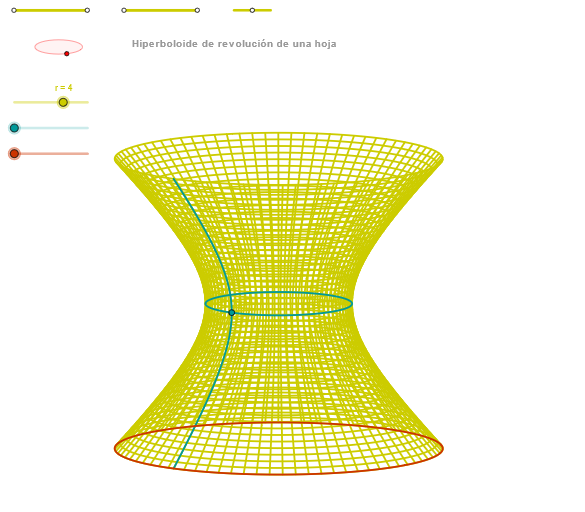
This example demonstrates the construction of a one-sheet hyperboloid, an important surface in solid geometry. Using GeoGebra commands such as Segment, Point, and OrthogonalLine, the generation process of the hyperboloid is visually illustrated. Suitable for high school mathematics education and students learning solid geometry.
GeoGebra Commands & Parameters
Segment(Q3, Q4) → p2Point(p2) → P3Segment(P3, Q4) → p4Point(p4) → P4Segment(Q1, Q2) → p1Point(p1) → P1Segment(P1, Q2) → p3Point(p3) → P2OrthogonalLine(C, xAxis) → zz2Circle(C, 0.62) → zz0Intersect(zz0, zz2, 1) → ZZ4Intersect(zz0, zz2, 2) → ZZ3Ellipse(ZZ3, ZZ4, 0.65) → zElipse2Point(zElipse2) → ZIntersect(zElipse2, zz2) → ZZ7, ZZ8Angle(ZZ8, C, Z) → zAngIncOrthogonalLine(C, yAxis) → zz1Intersect(zz0, zz1, 2) → ZZ2Intersect(zz0, zz1, 1) → ZZ1Ellipse(ZZ1, ZZ2, 0.65) → zElipse1Point(zElipse1) → XYIntersect(zElipse1, zz1) → ZZ5, ZZ6Angle(ZZ6, C, XY) → zAngRotSegment(Q5, Q6) → p5Point(p5) → P5Segment(ZZ5, ZZ6) → zz4Segment(ZZ7, ZZ8) → zz3Intersect(zElipse2, zElipse1, 1) → zPunto1Intersect(zElipse2, zElipse1, 4) → zPunto2Segment(zPunto1, zPunto2) → zSeg2CurveCartesian((r / 2 * (((sqrt(1 + v^(2)) * cos(α)) * sin(zAngRot)) + ((sqrt(1 + v^(2)) * sin(α)) * cos(zAngRot)))), (r / 2 * (((((-sqrt(1 + v^(2))) * cos(α)) * cos(zAngRot)) * sin(zAngInc)) + (((sqrt(1 + v^(2)) * sin(α)) * sin(zAngRot)) * sin(zAngInc)) + (v * cos(zAngInc)))), v, v1, v2) → curva2Sequence(CurveCartesian[(r / 2 * (((sqrt(1 + v^(2)) * cos(u)) * sin(zAngRot)) + ((sqrt(1 + v^(2)) * sin(u)) * cos(zAngRot)))), (r / 2 * (((((-sqrt(1 + v^(2))) * cos(u)) * cos(zAngRot)) * sin(zAngInc)) + (((sqrt(1 + v^(2)) * sin(u)) * sin(zAngRot)) * sin(zAngInc)) + (v * cos(zAngInc)))), u, u1, u2], v, v1, v2, paso) → list2CurveCartesian((r / 2 * ((cos(u) * sin(zAngRot)) + (sin(u) * cos(zAngRot)))), (r / 2 * ((((-cos(u)) * cos(zAngRot)) * sin(zAngInc)) + ((sin(u) * sin(zAngRot)) * sin(zAngInc)))), u, u1, u2) → curva1ACurveCartesian((r / 2 * (((sqrt(1 + β^(2)) * cos(u)) * sin(zAngRot)) + ((sqrt(1 + β^(2)) * sin(u)) * cos(zAngRot)))), (r / 2 * (((((-sqrt(1 + β^(2))) * cos(u)) * cos(zAngRot)) * sin(zAngInc)) + (((sqrt(1 + β^(2)) * sin(u)) * sin(zAngRot)) * sin(zAngInc)) + (β * cos(zAngInc)))), u, u1, u2) → a1Sequence(CurveCartesian[(r / 2 * (((sqrt(1 + v^(2)) * cos(u)) * sin(zAngRot)) + ((sqrt(1 + v^(2)) * sin(u)) * cos(zAngRot)))), (r / 2 * (((((-sqrt(1 + v^(2))) * cos(u)) * cos(zAngRot)) * sin(zAngInc)) + (((sqrt(1 + v^(2)) * sin(u)) * sin(zAngRot)) * sin(zAngInc)) + (v * cos(zAngInc)))), v, v1, v2], u, u1, u2, paso) → list1
AI Drawing Prompt Reference
To draw a one-sheet hyperboloid. First, create a circle and two lines perpendicular to the coordinate axes. The circle intersects the lines at two points, which serve as foci for two ellipses. The ellipses intersect the lines to form intersection points and angles. Then, use parametric curves based on these angles and ellipse parameters to generate the hyperboloid surface. The resulting curves form a continuous, symmetric three-dimensional shape suitable for solid geometry.
The prompt above was compiled from the original drawing commands and is for reference only.