
Octagonal Prism Construction
Loading the math board and drawing, please wait…
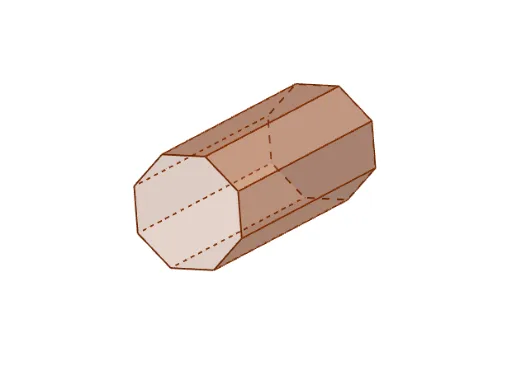
This example demonstrates the construction and visualization of an octagonal prism, involving core math concepts like solid geometry, polygon area calculation, and spatial geometric relationships. Key GeoGebra commands used include Plane, PointIn, Polygon, and Prism for creating the 3D shape. Suitable for high school geometry education or learning geometric software applications.
GeoGebra Commands & Parameters
Plane(B, A, C) → aPointIn(a) → DPointIn(a) → EPolygon(D, E, 8, a) → poly1, f, G, H, I, J, K, g, h, i, j, k, l, m, FPrism(poly1, 8.260898634095971) → b, L, faceEFNM, faceFGON, faceGHPO, faceHIQP, faceIJRQ, faceJKSR, faceDKSL, faceLMNOPQRS, edgeDL, edgeEM, M, edgeFN, edgeGO, edgeHP, edgeIQ, edgeJR, edgeKS, edgeLM, edgeMN, edgeNO, edgeOP, N, edgePQ, edgeQR, edgeRS, edgeLS, O, P, Q, R, S, faceDEML
AI Drawing Prompt Reference
In 3D space, define a plane and pick two points on it. Using these points as adjacent vertices, construct a regular octagon on the plane. Then extrude this octagon vertically by a fixed height to form an octagonal prism. The prism has two octagonal bases, eight rectangular lateral faces, and twelve lateral edges, creating a symmetric solid suitable for studying geometric properties and spatial relationships.
The prompt above was compiled from the original drawing commands and is for reference only.