
Octagon to Square Dissection
Loading the math board and drawing, please wait…
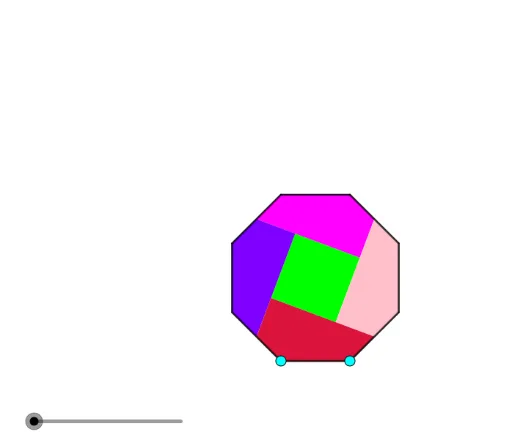
This example demonstrates a geometric dissection that transforms a regular octagon into a square of equal area, illustrating area conservation and similarity transformations. Core mathematical concepts include polygon area, translation, rotation, similarity, and special points such as midpoints and intersections. Construction uses GeoGebra commands: Polygon, Line, Midpoint, Circle, Intersect, OrthogonalLine, Angle, and If, to build auxiliary lines, midpoints, and perpendiculars, then reassemble pieces via translation and rotation. Suitable for middle and high school geometry classes, this interactive model helps students explore area-preserving dissections, transformation geometry, and problem-solving in geometric construction.
GeoGebra Commands & Parameters
Polygon(A, B, 8) → poly1, f, D, E, F, G, H, g, h, i, j, k, l, m, CLine(E, F) → k_1Midpoint(g) → MMidpoint(i) → JCircle(J, Segment[A, B]) → cIntersect(c, j, 1) → KMidpoint(m) → ILine(I, K) → nOrthogonalLine(M, n) → rIntersect(n, r) → NLine(J, n) → pIntersect(p, r) → OPolygon(N, O, 4) → poly2, s, t, a, b, P, QLine(P, Q) → r_1Angle(k_1, r_1) → αIf(2 ≤ u < 3, Translate[poly2, Vector[N, Dilate[N, 3 - u, F]]], Translate[poly2, Vector[N, F]]) → q1Midpoint(k) → LOrthogonalLine(L, p) → qPolygon(P, L, F, E, J) → poly3, p_1, l_1, f_1, e, j_1Polygon(O, M, C, D, J) → poly4, o, m_1, c_1, d, j_2Polygon(M, N, I, A, B) → poly5, m_2, n_1, i_1, a_1, b_1Polygon(I, H, G, L, Q) → poly6, i_2, h_1, g_1, l_2, q_1If(0 ≤ u < 1, Polygon[Rotate[O, (u * π), J], Rotate[M, (u * π), J], Rotate[C, (u * π), J], Rotate[D, (u * π), J], Rotate[J, (u * π), J]], Polygon[Rotate[O, π, J], Rotate[M, π, J], Rotate[C, π, J], Rotate[D, π, J], Rotate[J, π, J]]) → poly7If(0 ≤ u < 1, Polygon[Rotate[I, ((-u) * π), L], Rotate[H, ((-u) * π), L], Rotate[G, ((-u) * π), L], Rotate[L, ((-u) * π), L], Rotate[Q, ((-u) * π), L]], Polygon[Rotate[I, π, L], Rotate[H, π, L], Rotate[G, π, L], Rotate[L, π, L], Rotate[Q, π, L]]) → poly8If(0 ≤ u < 1, Rotate[I, ((-u) * π), L], Rotate[I, π, L]) → RIf(0 ≤ u < 1, Polygon[Rotate[M, ((-u) * π), L], Rotate[N, ((-u) * π), L], Rotate[I, ((-u) * π), L], Rotate[A, ((-u) * π), L], Rotate[B, ((-u) * π), L]], Polygon[Rotate[M, π, L], Rotate[N, π, L], Rotate[I, π, L], Rotate[A, π, L], Rotate[B, π, L]]) → poly9If(3 ≤ u, Rotate[q1, ((u - 3) * α), F], Rotate[q1, α, F]) → q2If(0 ≤ u < 1, Rotate[poly9, ((-u) * π), R], Rotate[poly9, π, R]) → poly10
AI Drawing Prompt Reference
Draw a regular octagon and construct an inscribed square of equal area. Use midpoints of sides, diagonal intersections, and perpendicular auxiliary lines to divide the octagon into several polygonal pieces. Then translate and rotate these pieces to reassemble them into a square, demonstrating area-preserving dissection. Include visible construction lines, intersection points, midpoints, and angle markers to show the transformation process.
The prompt above was compiled from the original drawing commands and is for reference only.