
Numbers Classification and Geometric Construction
Loading the math board and drawing, please wait…
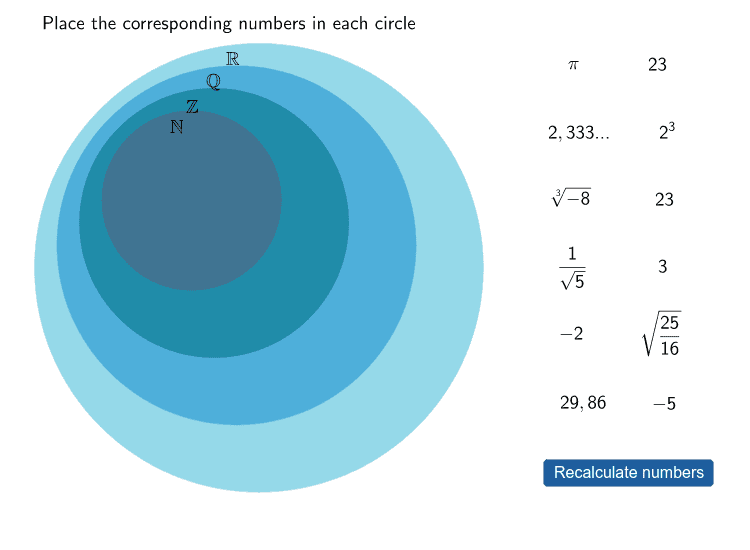
This example demonstrates the relationship between Numbers classification and geometric figures using GeoGebra. Key mathematical concepts include geometric construction, coordinate geometry, and graphing functions. The construction involves using commands like Sequence, Random, Element to create shapes, and objects such as I_2, G_2 for manipulation. Suitable for middle school students learning geometric foundations and function graphing.
GeoGebra Commands & Parameters
Sequence(Sample[{1, 2, 3, 4, 5, 6, 7, 8, 9, 10}, 10, false], i, 1, 10) → matriu1Random(1, 10) → fElement(matriu1, f, 1) → nn1Element(matriu1, f, 2) → nn2Element(matriu1, f, 3) → zz1Element(matriu1, f, 4) → zz2Element(matriu1, f, 5) → qq1Element(matriu1, f, 6) → qq2Element(matriu1, f, 7) → rr1Element(matriu1, f, 8) → rr2Element(matriu1, f, 9) → ii1Element(matriu1, f, 10) → ii2Circle(Z, D) → c_1Circle(Q, F) → d_1Circle(R, H) → e_1Element(matriu1, f, 1) → B1Element(matriu1, f, 2) → B2Element(matriu1, f, 3) → B3Element(matriu1, f, 4) → B4Element(matriu1, f, 5) → B5Element(matriu1, f, 6) → B6Element(matriu1, f, 7) → B7Element(matriu1, f, 8) → B8Element(matriu1, f, 9) → B9Element(matriu1, f, 10) → B10Circle(I, J) → f_1If(Distance[Element[punts, B1], Z] < 2, true, false) → C1If(Distance[Element[punts, B2], Z] < 2, true, false) → C2If((Distance[Element[punts, B3], Q] < 3) ∧ (Distance[Element[punts, B3], Z] > 2), true, false) → C3If((Distance[Element[punts, B4], Q] < 3) ∧ (Distance[Element[punts, B4], Z] > 2), true, false) → C4If((Distance[Element[punts, B5], R] < 4) ∧ (Distance[Element[punts, B5], Q] > 3), true, false) → C5If((Distance[Element[punts, B6], R] < 4) ∧ (Distance[Element[punts, B6], Q] > 3), true, false) → C6If((Distance[Element[punts, B7], I] < 5) ∧ (Distance[Element[punts, B7], R] > 4), true, false) → C7If((Distance[Element[punts, B8], I] < 5) ∧ (Distance[Element[punts, B8], R] > 4), true, false) → C8If(Distance[Element[punts, B9], Z] < 2, true, false) → C9If(Distance[Element[punts, B10], Z] < 2, true, false) → C10Polygon(A, C, E, G) → Polígon1, a, c_2, e_2, g_1Polygon(M1 + (0.5, 0.5), M1 + (0.5, (-0.5)), M1 + ((-0.5), (-0.5)), M1 + ((-0.5), 0.5)) → Polígon2, b, i, j, lPolygon(K, L, M, O) → Polígon3, k, l_1, m, oPolygon(P, S, T, U) → Polígon4, p, s, t_1, uPolygon(V, W, A_1, B_1) → Polígon5, v, w, a_1, b_1Polygon(C_1, D_1, E_1, F_1) → Polígon6, c_3, d_2, e_3, f_2Polygon(G_1, H_1, I_1, J_1) → Polígon7, g_2, h_1, i_1, j_1Polygon(K_1, L_1, M_1, N_1) → Polígon8, k_1, l_2, m_1, n_1Polygon(O_1, P_1, Q_1, R_1) → Polígon9, o_1, p_1, q_1, r_1Polygon(S_1, T_1, U_1, V_1) → Polígon10, s_1, t_2, u_1, v_1Polygon(W_1, Z_1, A_2, B_2) → Polígon11, w_1, z_1, a_2, b_2If(Distance[Element[punts, B1], I] < 5, true, false) → D1If(Distance[Element[punts, B2], I] < 5, true, false) → D2If(Distance[Element[punts, B3], I] < 5, true, false) → D3If(Distance[Element[punts, B4], I] < 5, true, false) → D4If(Distance[Element[punts, B5], I] < 5, true, false) → D5If(Distance[Element[punts, B6], I] < 5, true, false) → D6If(Distance[Element[punts, B7], I] < 5, true, false) → D7If(Distance[Element[punts, B8], I] < 5, true, false) → D8If(Distance[Element[punts, B9], I] < 5, true, false) → D9If(Distance[Element[punts, B10], I] < 5, true, false) → D10Polygon(C_2, D_2, E_2, F_2) → Polígon12, c_4, d_3, e_4, f_3Polygon(G_2, H_2, I_2, J_2) → Polígon13, g_3, h_2, i_2, j_2If((Distance[Element[punts, B11], I] < 4) ∧ (Distance[Element[punts, B11], R] > 3), true, false) → C11If(Distance[Element[punts, B11], I] < 5, true, false) → D11If(Distance[Element[punts, B12], I] < 5, true, false) → D12If((Distance[Element[punts, 12], Q] < 3) ∧ (Distance[Element[punts, 12], Z] > 2), true, false) → C12
AI Drawing Prompt Reference
Draw three circles with distinct centers and radii, plus an additional circle; then create eleven quadrilaterals each defined by four vertices arranged in a grid-like pattern; also classify ten random points by their distances to the circle centers: points within the first circle form one group, points between the first and second circles form a second group, points between the second and third circles form a third group, points between the third and fourth circles form a fourth group, and any remaining points revert to the first group. The figure illustrates the relationship between number classification and geometric construction.
The prompt above was compiled from the original drawing commands and is for reference only.