
Number Line Tool
Loading the math board and drawing, please wait…
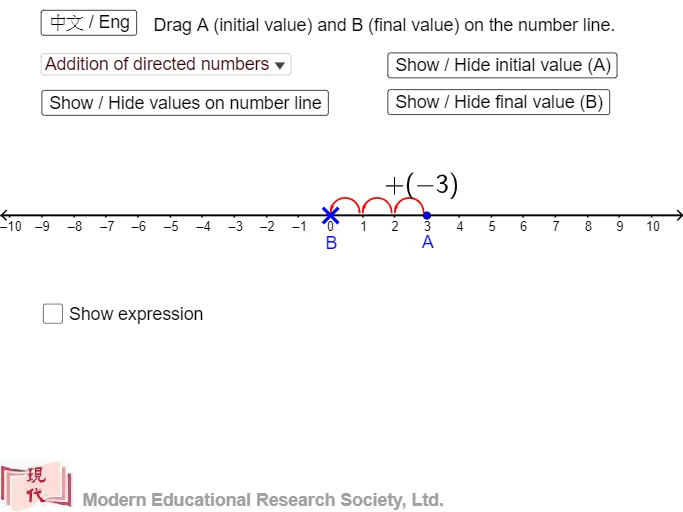
This example demonstrates the Number Line Tool, illustrating basic addition and subtraction concepts. Using GeoGebra commands such as Point, If, Sequence, and Corner, users can create and manipulate number lines. Suitable for high-grade elementary and junior high school students learning number lines and basic operations.
GeoGebra Commands & Parameters
Point(xAxis) → APoint(xAxis) → BIf(x(B) - x(A) > 0, "+", "") → sign2If(x(B) - x(A) < 0, "+", "") → sign3If(x(A) > 0, "+", "") → signaIf(x(B) - x(A) > 0, "+", "") → signbaIf(x(B) > x(A), "+", "-") → op2If(x(B) > 0, "+", "") → signbSequence(Vector[(((k + x(A) - 0.05) * dis), 0.3), (((k + x(A)) * dis), 0.1)], k, 1, Div[x(B) - x(A), dis]) → l2Sequence(Vector[(((x(A) - k + 0.05) * dis), 0.3), (((x(A) - k) * dis), 0.1)], k, 1, Div[x(A) - x(B), dis]) → l4Corner(1) → CIf(d ≟ true, textb, "") → textansSequence(Semicircle[(((k - 0.9 + x(A)) * dis), 0.1), (((k + x(A)) * dis), 0.1)], k, 1, Div[x(B) - x(A), dis]) → l1Sequence(Semicircle[(((x(A) - k) * dis), 0.1), (((x(A) + 0.9 - k) * dis), 0.1)], k, 1, Div[x(A) - x(B), dis]) → l3
AI Drawing Prompt Reference
Draw a horizontal number line with points at both ends, display plus or minus signs based on the positions of the points, and use vectors to represent multiple unit lengths from left to right, connecting them with semicircles to illustrate basic addition and subtraction concepts.
The prompt above was compiled from the original drawing commands and is for reference only.