
Normal Approximation to the Binomial Distribution
Loading the math board and drawing, please wait…
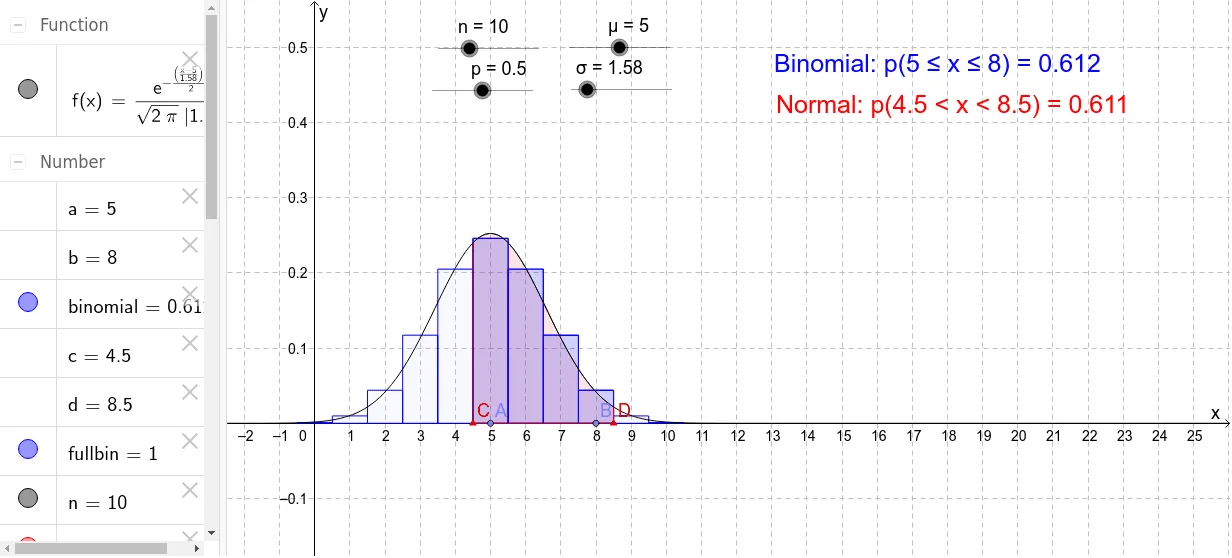
This example demonstrates how to adjust parameters using sliders to observe the relationship between the binomial and normal distributions. Key concepts include binomial and normal distributions. Commands used include Point, BinomialDist, BarChart, and Integral. Suitable for high school mathematics education and learning probability statistics.
GeoGebra Commands & Parameters
Point(xAxis) → BPoint(xAxis) → ABinomialDist(n, p) → fullbinBarChart(a - 0.5, b + 0.5, Sequence[((Binomial[n, r] * p^(r)) * (1 - p)^(n - r)), r, a, b]) → binomialPoint(xAxis) → CPoint(xAxis) → DIntegral(f, c, d) → normal
AI Drawing Prompt Reference
Draw a graph demonstrating the relationship between binomial and normal distributions, including two points on the horizontal axis, a bar chart for the binomial distribution, and an integral area for the normal distribution, observing the relationship by adjusting parameters, constructed in the order of drawing points on the horizontal axis, then the bar chart for the binomial distribution, and finally the integral area for the normal distribution.
The prompt above was compiled from the original drawing commands and is for reference only.