
Non-square Rhombus: Constructing a Rhombus with Circles and Segments
Loading the math board and drawing, please wait…
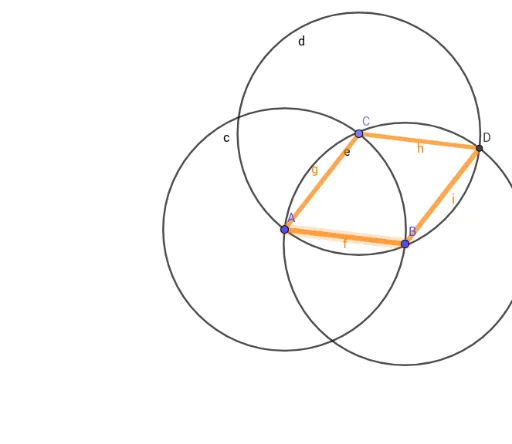
This example demonstrates how to construct a non-square rhombus using circles and line segments, visually showing that all four sides are equal while the interior angles are not right angles. The core mathematical concepts include the definition of a rhombus (equal sides), properties of circles (equal radii), intersection points of segments and circles, and basic polygon attributes. Construction steps: using GeoGebra commands Segment, Circle, Point, and Intersect, start with segment f between points A and B, draw circle c centered at A, find intersection C with the segment, then construct additional segments g, d, e and intersection D to form the quadrilateral h, i. This example is suitable for middle school geometry, helping students distinguish rhombi from squares and practice constructing special quadrilaterals with basic tools, also useful for introductory geometric construction exercises.
GeoGebra Commands & Parameters
Segment(A, B) → fCircle(A, Segment[A, B]) → cPoint(c) → CSegment(C, A) → gCircle(C, Segment[A, C]) → dCircle(B, Segment[A, B]) → eIntersect(d, e, 1) → DSegment(C, D) → hSegment(B, D) → i
AI Drawing Prompt Reference
Draw a non-square rhombus. Start with a horizontal segment as the base. Using its left endpoint as the center, draw a circle with radius equal to the segment length. Pick a point on this circle (not at the endpoints) and connect it to the left endpoint to form one side. Then, with that point as center, draw another circle of the same radius, and with the right endpoint as center, draw a circle with radius equal to the base length. Take one intersection of these two circles, and connect it to both the point on the first circle and the right endpoint. The resulting quadrilateral has four equal sides but no right angles.
The prompt above was compiled from the original drawing commands and is for reference only.